We tested 15 free feminine WordPress themes. Most looked good but failed on speed. Only a handful delivered on every front.
Over two weeks, we installed each theme on a fresh WordPress setup. We ran speed tests, checked Core Web Vitals, tested page builders, and evaluated design quality. Every theme was scored on three factors: speed, functionality, and design.
Astra came out on top with a total score of 84.6/100. But here’s the thing: Astra isn’t built specifically for feminine websites. It’s a multipurpose theme with feminine starter templates.
If you want a theme designed exclusively for feminine blogs and lifestyle brands, Blossom Feminine Pro is your best match. With 3,000+ active installations on WordPress.org, it’s one of the most trusted feminine themes available.
That said, every site has different needs. A yoga instructor, food blogger, and fashion influencer don’t need the same features. So we broke down each theme by use case, performance, and design to help you find the right fit, not just the fastest or prettiest option.
In this guide, you will find:
- Our top pick for each use case
- Speed test results for all 15 themes
- Core Web Vitals data (LCP, FCP, CLS) for mobile and desktop
- Full functionality breakdown for each theme
- Design quality analysis and rankings
- Our top pick for each use case
What Makes a WordPress Theme “Feminine”?
Feminine WordPress themes are designed for businesses and blogs targeting women. They use soft colors, elegant fonts, and refined layouts that appeal to fashion, beauty, and lifestyle audiences.
These themes look different from standard WordPress themes. They feature pastel color palettes or blush tones instead of bold primary colors.
Typography leans toward script fonts and delicate serifs. Spacing feels airy and uncluttered. Images take center stage with full-width headers and portfolio-style galleries.
Most feminine themes include:
- Instagram feed integration
- Multiple blog layout options
- E-commerce compatibility for selling products
- Custom widgets for social media
- Portfolio or gallery sections
- Newsletter signup forms
These features matter to lifestyle bloggers and beauty brands because their audiences expect visual polish. A feminine theme creates the right first impression. It tells visitors you understand style and aesthetics before they read a single word.
The right theme also converts better. When your design matches your audience’s taste, they stay longer. They trust your recommendations. They’re more likely to buy products or book services. Generic themes can’t deliver that connection.
Our Testing Methodology
To ensure fair and accurate results, we followed a consistent and structured testing process for every theme.
1. Testing Environment Setup
To create an equal comparison across all themes, we used the same setup for each test:
- WordPress 6.9.1 installed on shared hosting
- No caching plugins activated during testing
- Fresh WordPress install for every theme
- The same blog post with identical content and images published on each theme
This ensured a true apples-to-apples comparison with no performance advantages.
2. Speed Testing Process
Performance was measured using:
- Google PageSpeed Insights as the primary testing tool
- Both mobile and desktop performance scores were recorded
- Core Web Vitals measured:
- LCP (Largest Contentful Paint): Time until main content loads. Under 2.5s is good.
- FCP (First Contentful Paint): Time until first element appears. Under 1.8s is good.
- CLS (Cumulative Layout Shift): Visual stability score. Under 0.1 is good.
- Speed Index: How quickly content appears visually. Lower is better.
Each theme was tested in two stages:
- On a fresh installation
- After demo content import, where available
This allowed us to evaluate both baseline performance and real-world usage performance.
3. Design Evaluation Criteria
Our design team assessed each theme based on modern standards and usability:
- Alignment with current design trends
- Typography quality and readability
- Color scheme flexibility
- Mobile responsiveness across multiple devices
- Overall visual appeal
We focused not just on how a theme looks, but how effectively it communicates content.
4. Feminine-Specific Testing
Since this review focuses on feminine themes, we conducted additional targeted testing:
- Instagram feed integration in the homepage and sidebar areas
- Portfolio layouts for image clarity and grid flexibility
- Blog layout readability and visual hierarchy
- Newsletter integration with popular platforms like Mailchimp and ConvertKit
- Feminine design elements, including:
- Font pairings
- Color customization options
- Header styles
- Spacing and layout balance
- Font pairings
We evaluated whether the theme delivers an airy, elegant feel without sacrificing usability or readability.
Our Scoring System:
Each theme was scored across 3 key categories:
- Speed: 40% of total score
- Functionality: 35% of total score
- Design: 25% of total score
Final Score Formula: (Speed x 0.4) + (Functionality x 0.35) + (Design x 0.25) = Total Score
Why We Weighted It This Way
We weighted speed highest because slow themes lose visitors regardless of how beautiful they look.
Functionality comes second because lifestyle bloggers and beauty brands need Instagram integration and portfolio options to showcase their work effectively.
Design receives 25% weight because while aesthetics matter for feminine themes, they mean nothing if the site does not load or function properly.
Quick Comparison
| SN | Theme Name | Active Installs | WP Rating | Total Reviews | Last Updated | Tested Version | Speed | Functionality | Design | Total Score |
|---|---|---|---|---|---|---|---|---|---|---|
| 1 | Astra | 1 million | 4.9/5 | 6380 | February 6, 2026 | 4.12.3 | 99.5/100 | 75/100 | 74/100 | 84.6 |
| 2 | Elegant shop | 100 | 4.8/5 | 4 | August 3, 2025 | 1.0.8 | 97/100 | 75/100 | 68/100 | 82.1 |
| 3 | Blossom Studio | 100 | n/a/5 | n/a | February 11, 2026 | 1.1.0 | 76.5/100 | 90/100 | 76/100 | 81.1 |
| 4 | Cookery Lite | 500 | 5/5 | 2 | July 2, 2025 | 1.1.6 | 74.5/100 | 90/100 | 78/100 | 80.8 |
| 5 | Rishi Theme | n/a | n/a/5 | n/a | n/a | N/A | 72.5/100 | 90/100 | 75/100 | 79.3 |
| 6 | CoachPress Lite | 600 | 5/5 | 2 | January 21, 2026 | 1.2.5 | 73.5/100 | 85/100 | 80/100 | 79.2 |
| 7 | Chic Lite | 3000 | 5/5 | 10 | January 19, 2026 | 1.1.8 | 82/100 | 70/100 | 75/100 | 76.1 |
| 8 | Blossom Spa | 5000 | 4.6/5 | 18 | January 19, 2026 | 1.3.9 | 68/100 | 85/100 | 75/100 | 75.7 |
| 9 | Blossom Fashion | 1000 | 5/5 | 18 | January 19, 2026 | 1.4.5 | 73/100 | 80/100 | 70/100 | 74.7 |
| 10 | Blossom Wedding | 400 | 3/5 | 1 | January 21, 2026 | 1.1.5 | 64.5/100 | 85/100 | 70/100 | 73.1 |
| 11 | Blossom Travel | 2000 | 4.6/5 | 15 | January 8, 2026 | 1.2.5 | 67/100 | 80/100 | 72/100 | 72.8 |
| 12 | Elegant Pink | 800 | 4.5/5 | 15 | February 6, 2026 | 1.3.4 | 83.5/100 | 60/100 | 60/100 | 69.4 |
| 13 | Blossom Feminine | 3000 | 4.6/5 | 26 | January 8, 2026 | 1.5.2 | 70/100 | 70/100 | 66/100 | 69 |
| 14 | Feminine Business | 50 | 5/5 | 2 | August 24, 2025 | 1.0.4 | 66.5/100 | 70/100 | 71/100 | 68.9 |
| 15 | Blossom Pin | 2000 | 4.9/5 | 19 | January 19, 2026 | 1.3.7 | 68/100 | 70/100 | 68/100 | 68.7 |
Our Top 15 Feminine Themes
1. Astra Theme
Best For: All types of websites – multipurpose theme for blogs, businesses, portfolios, and online stores
Not Ideal For: Complete beginners wanting one-click solutions with elaborate pre-built sections; users needing advanced features (mega menus, typography controls) without paying for Pro
One-line verdict: Astra delivers the fastest fresh install performance we’ve tested (100/100 desktop, 99/100 mobile) making it the top choice for speed-obsessed site owners who can resist bloated demo templates.
Quick Scorecard
| Category | Score | Rank |
| Speed | 99.5/100 | #1 |
| Functionality | 75/100 | #9 |
| Design | 74/100 | #7 |
| Total Score | 84.6/100 | #1 |
| Overall Rating | ⭐⭐⭐⭐⭐ (4.7/5) |
Performance Deep Dive
We tested Astra twice:
- Fresh install: Installed the theme with one blog content
- After demo import: Used the Custom Template starter
This allowed us to measure baseline performance versus real-world usage with demo content.
| Metric | Mobile | Desktop |
|---|---|---|
| Score | 99/100 | 100/100 |
| LCP | 1.0s | 0.5s |
| FCP | 1.0s | 0.3s |
| CLS | 0 | 0 |
| Speed Index | 3.3s | 0.7s |
Fresh Install:
Astra scored 99/100 on mobile and 100/100 on desktop. The LCP measured 1.0s on mobile and 0.5s on desktop. These numbers fall well within Google’s “good” threshold of 2.5s, meaning users see content almost instantly.
After Demo Import / Real-World Setup:
Performance remained stable after importing the Custom Template starter. Scores held at 99/100 mobile and 100/100 desktop. The LCP stayed under 1.0s on both devices. If you add heavy plugins or large images later, monitor your LCP to keep it below 2.5s.
Features & Functionality
Forms & Lead Generation:
- Contact Forms: Yes, includes SureForms plugin
- Newsletter: No dedicated plugin included, but compatible with all major newsletter tools
Content & Layout:
- Blog Layouts: 4 blog page layouts (Full Width, Grid, List, Masonry). Single posts offer 4 page layouts with 4 sidebar options. Advanced single post features require Pro version.
- Portfolio: No dedicated portfolio section. Pages are flexible enough to build one manually.
- Testimonials: Yes
- Service/About Sections: No dedicated sections, but all pages support custom layouts and elements
E-commerce & Technical:
- WooCommerce: Yes
- Page Builders: Gutenberg and Elementor compatible
- Translation Ready: Yes
- Customization: Good
What’s Missing:
No dedicated newsletter solution ships with the theme. You need a third-party plugin like Mailchimp or ConvertKit for email capture. Portfolio functionality requires manual setup or additional plugins. Most advanced customization features live behind the pro paywall ($69).
What It Does Best
Astra dominates in speed. It scored 99/100 on mobile and a perfect 100/100 on desktop. No other theme in our tests matched these numbers.
The theme offers four distinct blog layouts including grid, list, and masonry options. Every page is highly customizable without touching code. This flexibility makes it genuinely multipurpose.
Astra works seamlessly with both Gutenberg and Elementor page builders. It also includes the SureForms plugin for contact forms and full WooCommerce integration. You get solid functionality without premium plugins.
Design Analysis
Important context: Astra is NOT a feminine-specific theme, but it provides feminine starter templates you can use.
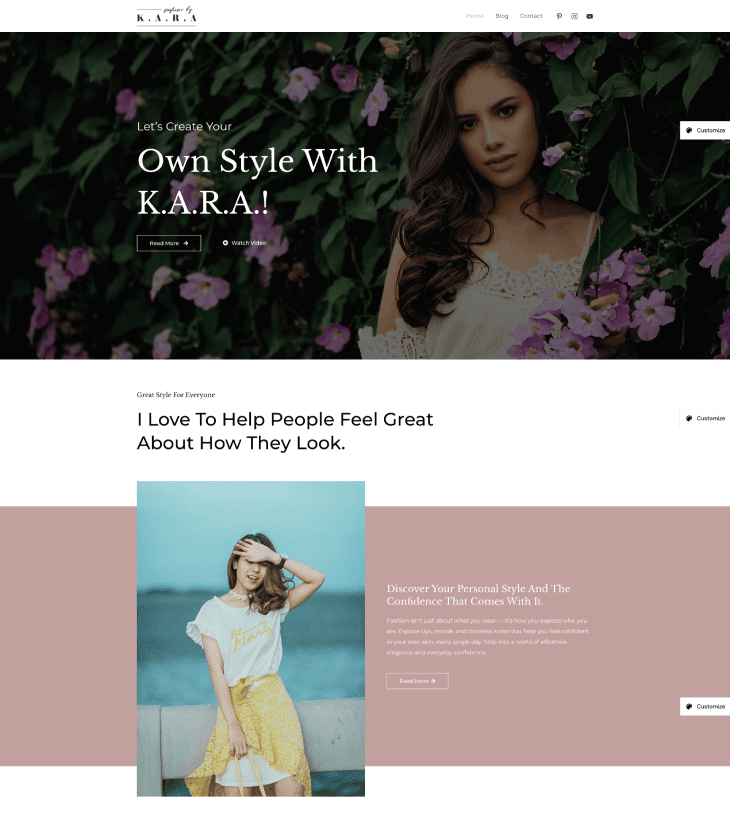
The starter template we used delivers minimalist personal elegance – a digital business card for the fashion creative who believes in restraint. The soft blush geometric background, script typography, and bento-box grid create a refined, boutique feel that prioritizes the person over the noise.
The design works for coaches, consultants, and lifestyle brands who want a clean presentation. Soft pink tones and geometric shapes create visual interest without overwhelming content. Script fonts add personality while maintaining readability.
Setup & Usability
Astra offers two setup paths: the AI Website Builder and custom templates with multiple starter options.
The AI Builder asks questions about your site and generates a layout automatically. This saves time but often creates bloated code that hurts performance. Custom templates give you more control over what gets imported.
First-time users should browse starter templates carefully. Import only the specific pages you need instead of the full demo package. This keeps your site lean and maintains the speed advantage Astra offers.
Premium Version
What You Get With Pro: Multiple page headers, mega menus, Beaver Builder integration, Lifter LMS and LearnDash compatibility, plus dedicated WooCommerce and Easy Digital Downloads features.
Premium Price: Starts at $69
The Pro version is quite expensive at $69 compared to competitors at $49-59. However, the features justify the price: AI Website Builder, Mega Menu, 300 starter templates, and WooCommerce-oriented features.
The Pro version makes sense for online course creators using Lifter LMS or LearnDash. WooCommerce store owners also benefit from the specialized e-commerce features. If you just need a fast blog or simple business site, the free version handles it fine.
Bottom Line
Astra earns the top overall score (84.6/100) by combining unmatched speed with solid functionality. For beginners, the learning curve is moderate. The free version is extensive enough for most users, but the $69 Pro cost is higher than competitors.
If speed is your top priority and you’re comfortable with customization, Astra is unbeatable.
Download: Astra Theme | Demo: View Demo
2. Elegant Shop
Best For: E-commerce websites
Not Ideal For: Corporate/company websites
One-line verdict: The fastest WooCommerce theme tested with a 97/100 speed score, perfect for store owners who prioritize lightning-fast load times over advanced design features.
Quick Scorecard
| Category | Score | Rank |
|---|---|---|
| Speed | 97/100 | #2 |
| Functionality | 75/100 | #10 |
| Design | 68/100 | #12 |
| Total Score | 82.1/100 | #2 |
| Overall Rating | 4.4/5 ⭐⭐⭐⭐ |
Performance Deep Dive
We tested Elegant Shop by:
- Fresh install: Installed the theme with one blog content
- After manual setup: Added WooCommerce, WPForms plugin, and manually created product pages to simulate real-world e-commerce usage
Since there’s no demo importer, we manually added content to test performance with realistic product catalogs and images.
| Metric | Mobile | Desktop |
|---|---|---|
| Score | 96/100 | 98/100 |
| LCP | 2.6 s | 0.5 s |
| FCP | 1.8 s | 0.4 s |
| CLS | 0.005 | 0.038 |
| Speed Index | 1.8 s | 1.5 s |
Fresh Install:
The theme scored 96/100 on mobile and 98/100 on desktop. The mobile LCP of 2.6 seconds falls within Google’s acceptable range but sits at the upper limit. Desktop performance is excellent with a 0.5 second LCP, which loads nearly instantly for visitors.
After Demo Import / Real-World Setup:
No demo import is available for this theme. You build your store from scratch, which means performance stays consistent but setup takes longer. Add products gradually and test speed after every 20-30 items to catch any performance drops early.
Features & Functionality
Forms & Lead Generation:
- Contact Forms: Yes, includes WPForms plugin
- Newsletter: Not included. Requires a third-party plugin.
Content & Layout:
- Blog Layouts: Single post page offers a minimal layout with 3 sidebar options. You can hide the author section, comments, and post date through the Customizer. No blog archive page customization options.
- Portfolio: Dedicated product display layouts and features replace the traditional portfolio section.
- Testimonials: Not included
- Service/About Sections: No dedicated sections, but custom pages are straightforward to create
E-commerce & Technical:
- WooCommerce: Yes
- Page Builders: Gutenberg and Elementor compatible
- Translation Ready: Yes
- Customization: Limited
What’s Missing:
No newsletter integration means you need a separate plugin for email collection. The blog page has zero customization options. You get the default layout with no control over columns or grid styles. There’s no demo importer, so you build everything from scratch without a starting template.
What It Does Best
The free version provides dedicated WooCommerce settings that let you control what displays on the main shop page. You can show products only, product categories only, or both together. You also control products per row and product image dimensions directly from the Customizer.
WPForms integration comes built-in for contact pages. This saves you the step of researching and installing a separate form plugin. The form builder works with drag-and-drop, making it accessible even if you have no coding experience.
It works seamlessly with both Gutenberg and Elementor page builders. Translation-ready features make it suitable for international stores.
Design Analysis
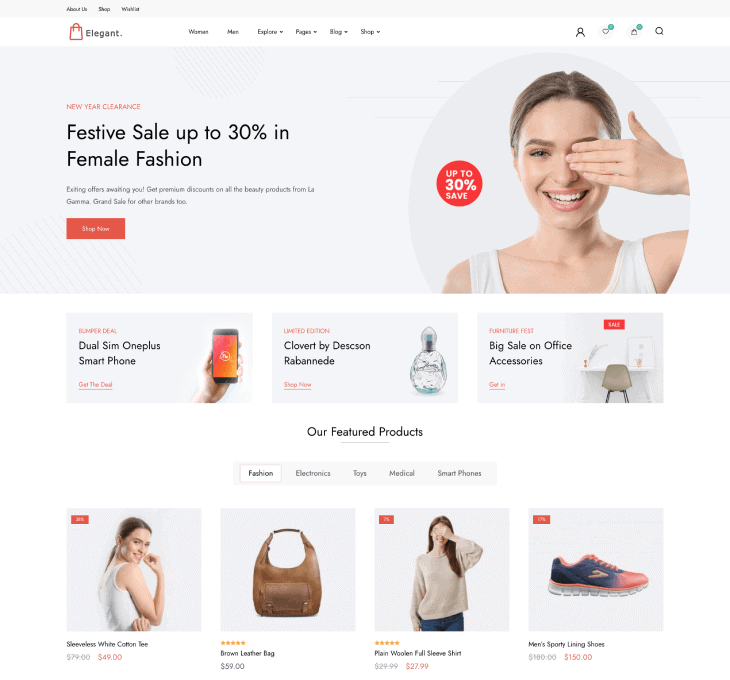
This is a competent, professional e-commerce design that checks all the functional boxes but doesn’t excel creatively. It’s safe and conventional, which works for conversion but won’t create memorable brand experiences.
Setup & Usability
No one-click demo importer available. You build your site from a blank canvas, which takes more time but gives you complete control.
The Customizer settings are straightforward with clear labels. First-time users should expect to spend several hours setting up menus, widgets, and WooCommerce product pages manually.
Premium Version
What You Get With Pro: 5 header layouts. 3 Banner designs, GDPR and CCPA Compliance tools
Premium Price: Starts at $59
The premium version adds necessary features for serious online stores. GDPR compliance is essential if you sell to European customers. Multiple header layouts give you more design flexibility. At $59, it’s worth upgrading if you need legal compliance features or want more header options.
Bottom Line
Elegant Shop earns its 82.1/100 score through exceptional speed performance. If fast load times matter more than fancy features, this theme delivers.
The design is basic, and functionality is limited, but the speed advantage is real and measurable. For store owners who understand that every second of load time affects sales, this is your theme.
Download: Elegant Shop | Demo: View Demo
3. Blossom Studio
Best For: Yoga studios, dance schools, meditation centers, creative professionals needing portfolio displays
Not Ideal For: Full ecommerce stores (limited WooCommerce styling), corporate websites (design is too soft and creative-focused)
One-line verdict: A well-optimized studio theme that scores 90/100 on functionality with dedicated portfolio pages and unique newsletter tools. It is perfect for creative professionals who need more than just a blog.
Quick Scorecard
| Category | Score | Rank |
|---|---|---|
| Speed | 76.5/100 | #5 |
| Functionality | 90/100 | #1 |
| Design | 76/100 | #3 |
| Total Score | 81.1/100 | #3 |
| Overall Rating | 4.2/5 ⭐⭐⭐⭐ |
Performance Deep Dive
We tested Blossom Studio by:
- Fresh install: Installed the theme with one blog content
- After manual setup: Installed Contact Form 7, BlossomThemes Newsletter plugin, and created portfolio pages to simulate real-world studio usage
Since there’s no demo importer in the free version, we manually installed all the recommended plugins. And, built service pages to test performance with realistic yoga/wellness content.
| Metric | Mobile | Desktop |
|---|---|---|
| Score | 71/100 | 82/100 |
| LCP | 18.2 s | 2.5 s |
| FCP | 2.6 s | 1.2 s |
| CLS | 0 | 0.001 |
| Speed Index | 2.9 s | 1.7 s |
Fresh Install:
The fresh install scored 71/100 on mobile and 82/100 on desktop. The mobile LCP of 18.2 seconds is slow and fails Google’s Core Web Vitals threshold. Desktop LCP of 2.5 seconds meets the “good” standard. The Speed Index of 2.9 seconds on mobile means users wait nearly three seconds before the page appears visually complete.
After Demo Import / Real-World Setup:
Demo import was not provided, so we cannot compare how real-world content affects speed. Based on the fresh install numbers, expect mobile performance to struggle with image-heavy portfolios or multiple sliders. Optimize images before upload and limit homepage sections to five or fewer to maintain acceptable mobile speeds.
Features & Functionality
Forms & Lead Generation:
- Contact Forms: Yes, includes Contact Form 7 plugin
- Newsletter: Yes, includes BlossomThemes Newsletter plugin. Connects to Mailchimp, Brevo, and more. Supports popups via shortcodes.
Content & Layout:
- Blog Layouts: 3 layout options (Elementor Canvas, Elementor Full Width, Theme). 4 sidebar layouts for single post pages. Customizer controls for hiding/showing author section, category, post date, and featured image.
- Portfolio: Dedicated portfolio page included
- Testimonials: Yes
- Service/About Sections: About section included
E-commerce & Technical:
- WooCommerce: Yes
- Page Builders: Gutenberg and Elementor compatible
- Translation Ready: Yes
- Customization: Good
What’s Missing:
Only 2 header layouts are available (with and without topbar) compared to 9 in Pro.
Image lazy loading and performance settings require the premium upgrade. However, for yoga studio needs, these missing features are optional – the core functionality is already present.
What It Does Best
Blossom Studio ranks #1 in functionality with 90/100 (tied with Rishi Theme and Cookery Lite). This theme is designed for yoga studios, fitness centers, and wellness coaches. The high functionality score reflects complete features for the yoga/wellness niche.
This theme handles educational content well with compatibility for both LearnDash and Tutor LMS plugins. If you teach yoga classes or online wellness courses, you can sell them directly through your site without extra plugins.
The customizer provides granular control over blog post elements. You can hide or show the author section, category, post date, and featured image independently. Four sidebar layout options let you adjust content width without touching code. These controls work on both single posts and archive pages.
Design Analysis
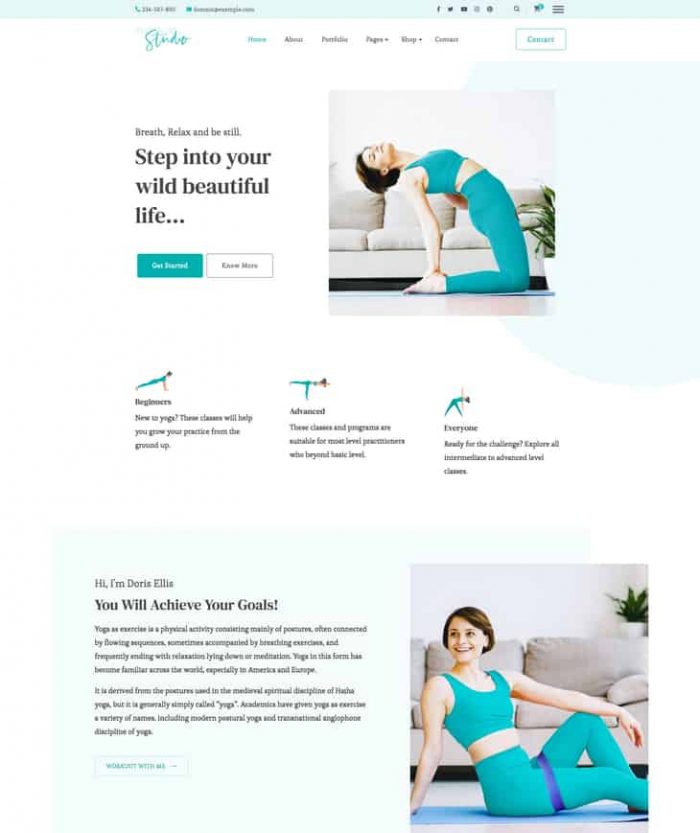
For a yoga niche, this is an average theme with good design.The teal and turquoise accent colors create a calm, creative vibe. This works better for yoga studios and creative professionals than the typical corporate blue or aggressive fitness orange. The design feels approachable without looking unprofessional.
Setup & Usability
No demo importer is available in the free version. You build your site from scratch, creating pages and configuring the portfolio section manually. First-time WordPress users should budget 4-6 hours for initial setup.
Premium Version
What You Get With Pro: Demo importer, heading typography controls, full footer copyright customization, 9 header layouts (up from 2), 4 slider layout options. Landing page templates for services, consultation, testimonials, eBooks, free courses, and paid courses. Author signature with social media profiles, image lazy loading, and performance settings.
Premium Price: Starts at $59
There isn’t much difference between the pro and free versions except for landing page templates along with header and slider layouts. You can enjoy most features or even build yourself a landing page in the free version if you have experience in design and custom CSS. For a yoga niche, this provides the right amount of features neither too few nor too many.
Bottom Line
For a service-based niche like yoga studios, this theme provides the right amount of features in both free and premium versions. If you run a wellness business and need portfolio pages, course integration, and newsletter tools without buying multiple plugins, this is your best free option among yoga/wellness themes.
Download: Blossom Studio | Demo: View Demo
4. Cookery Lite
Best For: Recipe and food bloggers building personal brands, home cooks sharing family recipes, Pinterest-focused food content creators
Not Ideal For: Restaurants, Cafess, or any non-food niche
One-line verdict: A purpose-built recipe blogging theme scoring 90/100 for functionality with complete recipe features (cards, nutrition charts, printing) in both free and Pro. Free version is enough for starting out, upgrade to Pro ($59) only when selling courses or books.
Quick Scorecard
| Category | Score | Rank |
|---|---|---|
| Speed | 74.5/100 | #6 |
| Functionality | 90/100 | #2 |
| Design | 78/100 | #2 |
| Total Score | 80.8/100 | #4 |
| Overall Rating | 4.2/5 ⭐⭐⭐⭐ |
Performance Deep Dive
We tested Cookery Lite by:
- Fresh install: Installed the theme with one blog content
- After manual setup: Installed Contact Form 7, BlossomThemes Newsletter plugin, and WP Delicious plugin (for recipe features) to simulate real-world food blogging usage
Since there’s no demo importer in the free version, we manually created recipe posts to test performance with realistic food photography.
| Metric | Mobile | Desktop |
|---|---|---|
| Score | 70/100 | 79/100 |
| LCP | 23.3 s | 3.9 s |
| FCP | 2.9 s | 0.8 s |
| CLS | 0.026 | 0.001 |
| Speed Index | 2.9 s | 1.1 s |
Fresh Install:
Mobile scored 70/100 with a desktop score of 79/100. The mobile LCP of 23.3 seconds is extremely slow and will hurt user experience on phones. Desktop LCP at 3.9 seconds is acceptable but still above the recommended 2.5 second threshold.
After Demo Import / Real-World Setup:
After manual setup, significant performance drop. Mobile score fell to 42 and CLS increased dramatically to 0.904, indicating severe layout instability. Compress images before uploading and consider a caching plugin to improve mobile performance.
Features & Functionality
Forms & Lead Generation:
- Contact Forms: Yes, includes Contact Form 7 plugin
- Newsletter: Yes, includes BlossomThemes Newsletter plugin. Connects to Mailchimp and Brevo. Supports popups via shortcodes.
Content & Layout:
- Blog Layouts: Simple minimal layout with 4 sidebar options for single posts. Customizer controls for hiding/showing author, categories, dates, and featured images.
- Portfolio: Recipe page templates with nutrition charts, recipe cards, and printing options replace the traditional portfolio.
- Testimonials: Yes
- Service/About Sections: About section included
E-commerce & Technical:
- WooCommerce: Yes
- Page Builders: Gutenberg and Elementor compatible
- Translation Ready: Yes
- Customization: Good
What’s Missing:
Header layout options are limited to one style without the premium upgrade. No landing page templates for lead magnets or courses without upgrading to premium.
However, for recipe-specific features, nothing critical is missing. The WP Delicious plugin provides everything food bloggers need.
What It Does Best
Cookery Lite is specially built for food and recipe bloggers with all features focused around recipe presentation. The functionality score of 90/100 reflects exceptional recipe-specific capabilities.
For recipe bloggers, both free and Pro versions provide the complete recipe experience through the WP Delicious plugin: nutrition charts, recipe cards, video instructions, ingredient lists, and print-friendly layouts.
Design Analysis
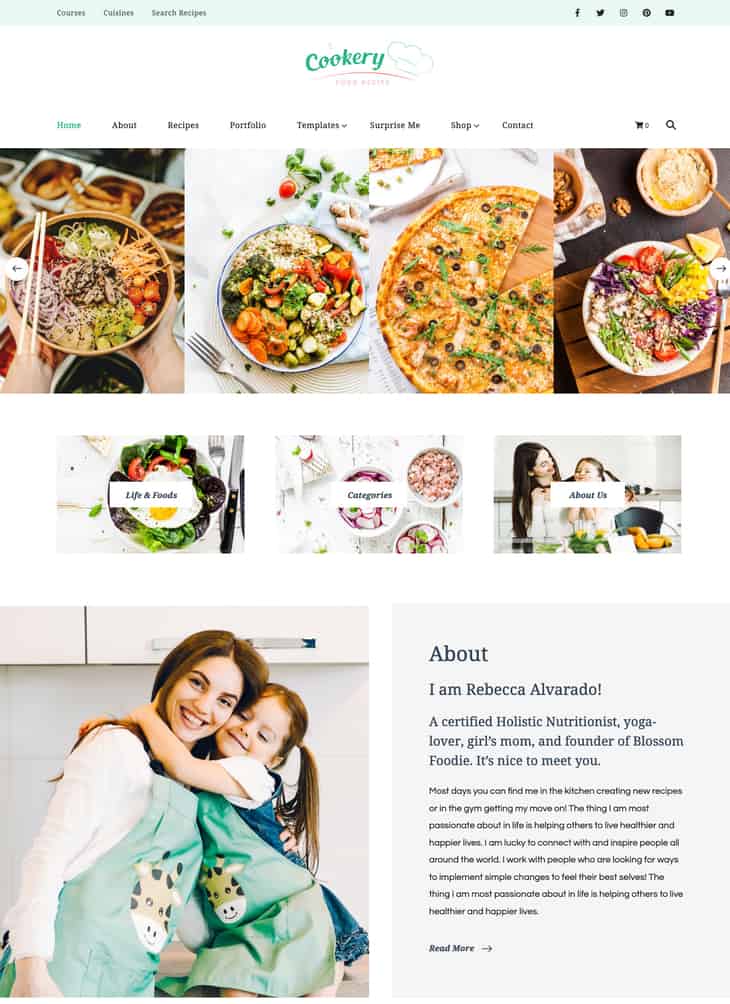
This theme is specially built for food and recipe bloggers with design focused around making recipes look appetizing.
Large, vibrant food photography dominates the layout and makes recipes look appealing immediately. The sliding gallery showcases variety while the clean list format below includes thumbnails, cook times, and serving counts.
Setup & Usability
No demo import option in the free version. You’ll configure the WP Delicious plugin settings, add recipe card layouts, and set up newsletter forms manually. The learning curve is moderate. Recipe cards require reading documentation.
Premium Version
What You Get With Pro: Demo Importer, Heading Typography control, Full Footer Copyrights, 6 Header layouts, 3 Newsletter Banner layouts, 5 recipe layouts, 9 homepage layouts, landing page templates for newsletters, free books, freebies, consulting, courses, press, and kitchen pages
Premium Price: Starts at $59
The premium version is worth it if you plan to monetize beyond display ads. The landing page templates for lead magnets (free books, freebies) and courses help you build an email list and sell digital products.
Food bloggers serious about their business should upgrade. The 5 recipe layout options and 9 homepage layouts give you design variety to keep your site fresh.
However, hobby bloggers can stick with the free version—the core recipe features are already there. Only upgrade when you’re ready to sell courses, books, or need professional landing pages.
Bottom Line
Cookery Lite delivers specialized recipe features and email marketing tools that general blog themes lack. The 90/100 functionality score reflects real value for food bloggers. This theme provides most features needed for a recipe blogging website.
However, the mobile speed issues require aggressive image optimization. Compress all food photos before upload, use lazy loading, and consider a caching plugin.
Download: Cookery Lite | Demo: View Demo
5. Rishi Theme
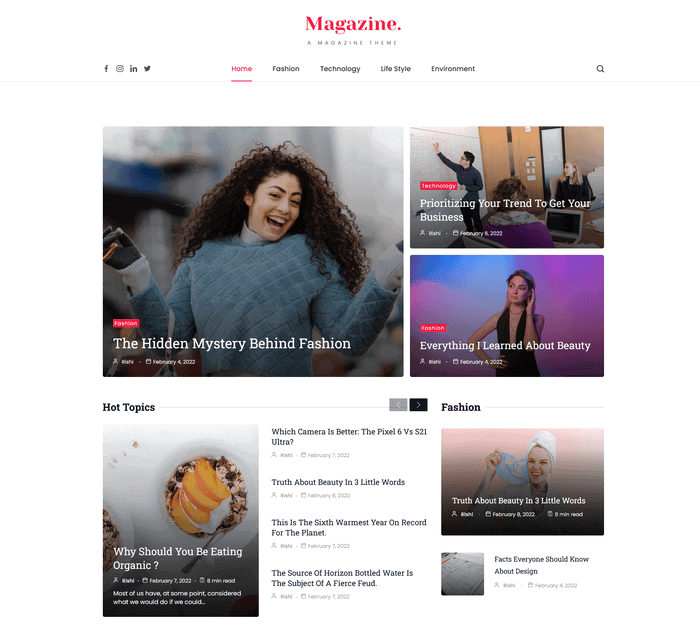
Best For: All types of websites – true multipurpose theme for blogs, businesses, portfolios, and online stores
Not Ideal For:
One-line verdict: A functionality powerhouse scoring 90/100 that offers exceptional blog customization and dramatically better performance with demo content (82/100 mobile vs 69/100 fresh install).
Quick Scorecard
| Category | Score | Rank |
|---|---|---|
| Speed | 72.5/100 | #9 |
| Functionality | 90/100 | #1 |
| Design | 75/100 | #2 |
| Total Score | 79.3/100 | #3 |
| Overall Rating | 4.3/5 ⭐⭐⭐⭐ | – |
Performance Deep Dive
We tested Rishi Theme twice:
- Fresh install: Installed the theme with no demo content
- After demo import: Used the Magazine starter template
| Metric | Mobile | Desktop |
|---|---|---|
| Score | 69/100 | 76/100 |
| LCP | 11.7 s | 5.0 s |
| FCP | 2.6 s | 0.7 s |
| CLS | 0 | 0 |
| Speed Index | 4.4 s | 1.4 s |
Fresh Install:
Mobile scored 69/100, and desktop hit 76/100. The LCP of 11.7 seconds on mobile is slow and needs improvement. Desktop LCP at 5.0 seconds is acceptable but not fast.
After Demo Import / Real-World Setup:
Performance stayed consistent after importing the Magazine template. The zero CLS score on both mobile and desktop means no layout shifts during page load. To improve mobile LCP, reduce image sizes and enable lazy loading for images below the fold.
Features & Functionality
Forms & Lead Generation:
- Contact Forms: Compatible with Contact Form 7
- Newsletter: Compatible with most newsletter plugins. No dedicated plugin included.
Content & Layout:
- Blog Layouts: 5 single post layouts with drag-and-drop element ordering (featured image, title, meta). 4 blog page layouts (Grid, List, Masonry, Classic). Full control over comment position and related posts display.
- Portfolio: No dedicated portfolio section. Pages are highly customizable for building one manually.
- Testimonials: Yes
- Service/About Sections: No dedicated sections. Pages are flexible enough to build these manually.
E-commerce & Technical:
- WooCommerce: Yes
- Page Builders: Gutenberg and Elementor compatible
- Translation Ready: Yes
- Customization: Excellent
What’s Missing:
No dedicated portfolio or service page templates. No built-in newsletter integration requires installing third-party plugins. The theme focuses heavily on blogging, so non-blog websites may need extra setup work.
What It Does Best
Rishi Theme ranks first in functionality with a 90/100 score. The key advantage over competitors: advanced features are FREE. You get 11 header layouts, 5 single post layouts, and 4 blog page layouts without paying. Most feminine themes lock this customization behind $59-69 paywalls. Rishi gives it to you at zero cost.
The blog customization options are exceptional. You can rearrange post elements like featured images and titles through drag-and-drop. Related posts can be displayed by category or tags, and you control the comment form position without touching code.
It comes with 90 starter templates total: 31 free and 59 premium. Even with just the free templates, you have more variety than most paid themes offer.
Design Analysis
This is NOT a feminine-specific theme. It’s multipurpose with templates for various niches.
For testing, we used the Magazine template, which works excellently for lifestyle and fashion blogging despite not being explicitly feminine. The design is clean and highly customizable, but it doesn’t provide the soft, aesthetic feminine vibe that themes like CoachPress Lite or Blossom Fashion offer out of the box.
The strength here is flexibility: typography controls let you adjust font pairings without coding, and the 31 free templates give you design variety. The Wedding template uses softer colors and elegant spacing if you prefer a more feminine approach.
You can always customize colors and create a feminine aesthetic yourself, but if you specifically want pre-designed feminine elegance, consider dedicated feminine themes instead.
Setup & Usability
The demo importer makes setup straightforward for beginners. Click import, choose a starter template, and wait 2-3 minutes. The imported content includes optimized images and proper formatting. First-time users should definitely use a starter template instead of building from scratch.
Premium Version
What You Get With Pro: 59 additional premium starter templates (90 total with free), AdBlocker Detector, Multiple Authors for Credibility, Inline Related Posts, Affiliate Disclosure section, News Ticker, Emojis Reaction, sticky promo sections, dark mode option, and smart lazy loading for images.
Premium Price: Starts at $49
Pro version is the BEST VALUE in this entire review. At $49, it’s $10-20 cheaper than competitors while offering significantly more: 90 total starter templates covering every niche imaginable, unique features other themes don’t provide (AdBlocker Detector, Affiliate Disclosure), and advanced monetization tools.
The premium version makes sense for serious bloggers running ad-supported sites or building authority blogs. The AdBlocker Detector helps you message visitors blocking ads, while the Affiliate Disclosure section adds credibility to sponsored content.
However, casual bloggers can skip the upgrade entirely. The free version already includes more customization than most themes’ paid versions. Only upgrade if you monetize through ads (AdBlocker Detector) or need multi-author capabilities.
Bottom Line
Rishi Theme earns fifth place overall with a 79.3/100 score by delivering premium-level functionality in a free package. This is the most functional free theme in this entire review – features that competitors charge $59-69 for are completely free here
Download: Rishi Theme | Demo: View Demo
6. CoachPress Lite
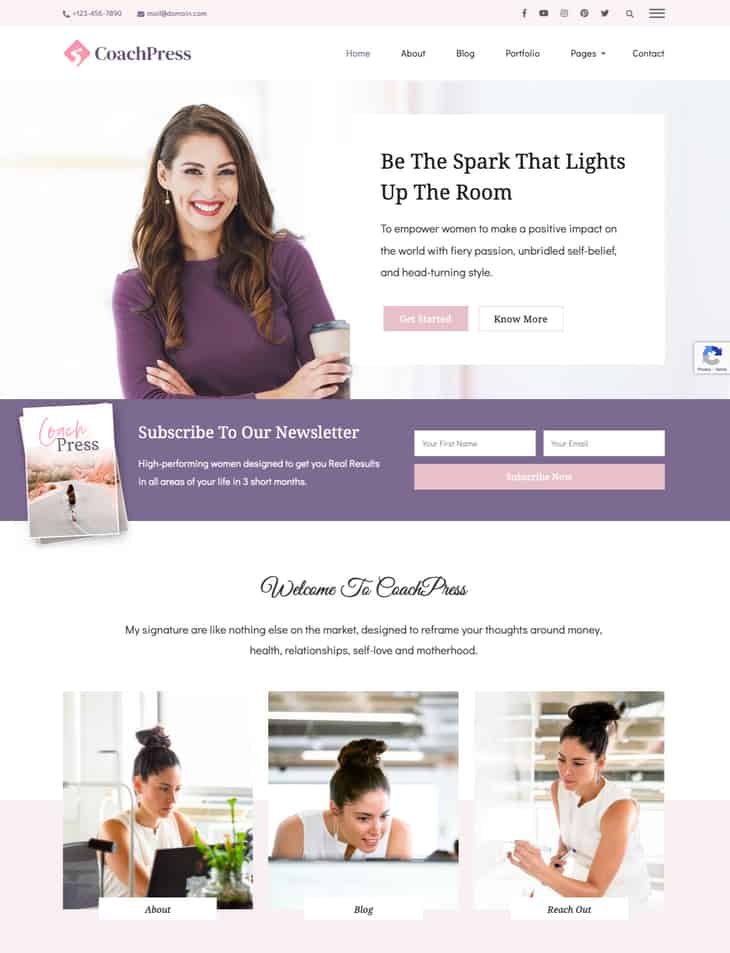
Best For: Coaches, consultants, and similar service-based businesses
Not Ideal For: E-commerce stores, corporate websites, or content-heavy blogs
One-line verdict: CoachPress Lite ranks #1 in design with a polished feminine aesthetic perfect for life coaches and consultants who need built-in lead generation tools without sacrificing visual appeal.
Quick Scorecard
| Category | Score | Rank |
|---|---|---|
| Speed | 73.5/100 | #7 |
| Functionality | 85/100 | #4 |
| Design | 80/100 | #1 |
| Total Score | 79.2/100 | #6 |
| Overall Rating | 4.2/5 ⭐⭐⭐⭐ |
Performance Deep Dive
We tested CoachPress Lite by:
- Fresh install: Installed the theme with one blog content
- After manual setup: Installed Contact Form 7, BlossomThemes Newsletter, and the Wheel of Life assessment plugin to simulate coaching business usage
Since there’s no demo import in the free version, we manually created service pages to test performance with coaching content.
| Metric | Mobile | Desktop |
|---|---|---|
| Score | 70/100 | 77/100 |
| LCP | 14.4 s | 4.5 s |
| FCP | 2.9 s | 0.8 s |
| CLS | 0 | 0 |
| Speed Index | 3.0 s | 1.2 s |
Fresh Install:
Mobile scored 70/100, and desktop hit 77/100. The mobile LCP of 14.4 seconds is slow by modern standards. Most users will see content appear after 14 seconds on mobile, which hurts first impressions and search rankings.
After Demo Import / Real-World Setup:
After manual setup, the desktop jumps to 94/100 while the mobile stays at 71/100. The mobile LCP of 14.4s improves to 6.3s with optimized content.
Features & Functionality
Forms & Lead Generation:
- Contact Forms: Yes, includes Contact Form 7 plugin
- Newsletter: Yes, includes BlossomThemes Newsletter plugin. Connects to Mailchimp, Brevo, and more. Supports popups via shortcodes.
Content & Layout:
- Blog Layouts: Simple minimal layout with 4 sidebar options for single post pages. The Pro version adds 4 distinct blog layout designs. Customizer controls for hiding/showing the author section, category, post date, and featured image.
- Portfolio: Dedicated portfolio page included
- Testimonials: Yes
- Service/About Sections: About section included
E-commerce & Technical:
- WooCommerce: Yes
- Page Builders: Gutenberg and Elementor compatible
- Translation Ready: Yes
- Customization: Good
What’s Missing:
No advanced typography controls for headings without upgrading to Pro. The blog layout options are limited to 4 basic sidebar positions in the free version, while pro users get actual design variations.
Most importantly, landing page templates for consultations, courses, and ebooks are locked in Pro. These are essential for client conversion.
What It Does Best
CoachPress Lite is specifically designed for coaches, consultants, and coaching-related businesses. The priority here is showcasing services rather than blogging. Reflected in features like the Wheel of Life assessment plugin, built specifically for coaches.
The functionality score of 85/100 (ranked #4) is excellent for service-based businesses. However, understand that most advanced service features like landing page templates for consultations, courses, ebooks, and freebies are locked in the Pro version.
The free version establishes an online presence and credibility, but for actual client conversion through online channels, you need Pro.
Design Analysis
This theme embraces soft authority aesthetics. Blush pink meets boardroom confidence. The muted rose palette, elegant script typography, and generous whitespace create a feminine foundation, while structured grid layouts and professional photography keep it business-serious.
It is visually gentle but strategically sharp, using color blocking (pink sections alternating with white) to guide the eye through a clear hierarchy. The overall impression is polished, warm, and intentionally premium feminine.
Setup & Usability
No demo import option in the free version means you build everything manually. You’ll need to create pages, add content, and configure sections yourself using the customizer. The Wheel of Life plugin requires separate setup.
Expect 3-4 hours to get a professional-looking site running. The customizer is well-organized but you’re starting from scratch.
Premium Version
What You Get With Pro: Demo importer with 6 starter templates, heading typography control, full copyright options, 8 header layouts, 4 slider layouts, 3 newsletter layouts, 7 single post layouts, landing page templates for services, consultation, testimonials, eBook, free courses, and courses. Image lazy loading, Polylang compatibility, and one-page website option included.
Premium Price: Starts at $69
The Pro version is ESSENTIAL for coaches running serious businesses. The free version only establishes an online presence. For actual client conversion and booking clients online, you need Pro’s landing page templates for consultations, courses, and ebooks.
The 6 starter templates eliminate hours of design work and provide conversion-focused layouts tested for coaching businesses. The optimization features (lazy loading, Polylang compatibility, one-page website option) improve performance and international reach.
If you’re just testing whether coaching works for you, start with the free version. If you’re ready to book clients and sell courses online, budget the $69 as a required investment, not an optional upgrade. The landing pages alone justify the cost for serious coaches.
Bottom Line
CoachPress Lite scores 79.2/100 overall with the highest design ranking at 80/100. The blush-toned professional look works well for coaches who need warmth and credibility.
The free version covers basic online presence but lacks conversion tools. Upgrade to pro if you sell coaching services and need landing pages that generate leads.
Download: CoachPress Lite | Demo: View Demo
7. Chic Lite
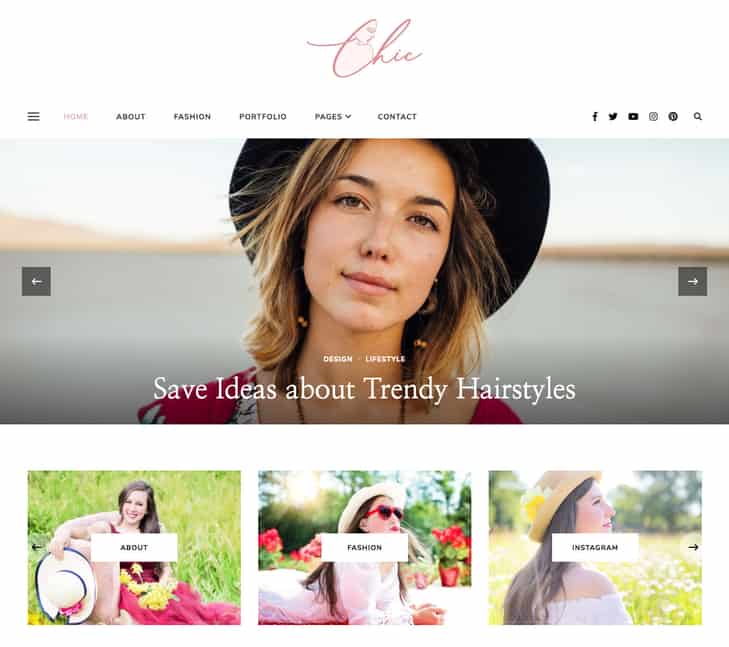
Best For: All types of blogs, including lifestyle, fashion, mom, parenting and more
Not Ideal For: Corporate and e-commerce websites
One-line verdict: A fashion-focused editorial theme (76.1/100) with rare one-click demo import in the FREE version and 22 custom widgets.
Quick Scorecard
| Category | Score | Rank |
|---|---|---|
| Speed | 82/100 | #4 |
| Functionality | 70/100 | #11 |
| Design | 75/100 | #5 |
| Total Score | 76.1/100 | #7 |
| Overall Rating | 4.1/5 ⭐⭐⭐⭐ |
Performance Deep Dive
We tested Chic Lite twice:
- Fresh install: Installed the theme with one blog content
- After demo import: Used the one-click demo importer available in the free version
| Metric | Mobile | Desktop |
|---|---|---|
| Score | 68/100 | 96/100 |
| LCP | 6.2 s | 1.2 s |
| FCP | 3.2 s | 0.8 s |
| CLS | 0.013 | 0.009 |
| Speed Index | 5.1 s | 1.4 s |
Fresh Install:
Mobile scored 68/100 with an LCP of 6.2 seconds. That means visitors on phones wait over six seconds before the main content appears, which is slow. Desktop performed much better at 96/100 with a 1.2-second LCP, which is acceptable for most blogs.
After Demo Import / Real-World Setup:
After the manual import, performance crashes to 48/100 on mobile and 58/100 on desktop. Mobile LCP jumps from 6.2 seconds to 13.2 seconds. The CLS score explodes from 0.013 to 0.403, causing major layout shifts that frustrate visitors.
Features & Functionality
Forms & Lead Generation:
- Contact Forms: Compatible with Contact Form 7
- Newsletter: Yes, includes BlossomThemes Newsletter plugin. Connects to Brevo, Mailchimp, and others. Supports popups via shortcodes.
Content & Layout:
- Blog Layouts: Simple minimal layout with 3 sidebar options for posts in the free version. Pro version adds 7 slider layouts and 7 single post layouts.
- Portfolio: Dedicated portfolio page included
- Testimonials: Yes, via widget
- Service/About Sections: No dedicated section. Can be built using available widgets.
E-commerce & Technical:
- WooCommerce: Yes
- Page Builders: Gutenberg compatible
- Translation Ready: Yes
- Customization: Limited in free version
What’s Missing:
The free version locks most layout options behind the pro paywall. You get only one basic blog layout while pro users get 7 slider layouts and 7 post layouts.
The demo import requires multiple manual steps instead of one-click installation, which adds setup time. No dedicated about or services sections means you build those pages from scratch using generic templates.
What It Does Best
The built-in newsletter plugin saves you from installing third-party tools. It connects directly to Mailchimp and Brevo, and includes popup display options with shortcode control. This gives you email capture without adding extra plugins that slow your site.
The portfolio page comes ready to use in the free version. Many themes charge for portfolio features or require page builder plugins. This one includes it as a standard template.
Design Analysis
Design Score: 75/100 (Ranked #4)
This theme delivers understated editorial elegance. A clean canvas that lets fashion photography do the talking. The black-white-blush palette, script logo, and generous whitespace create a refined, magazine-inspired aesthetic that feels polished without trying too hard.
The design is deliberately restrained, prioritizing readability and content hierarchy over decorative flourishes.
Setup & Usability
Setup Difficulty: 3/5
The demo import exists but requires multiple manual steps to complete. There is no one-click setup option. Our recommendation: skip the demo entirely and start with the blank theme. You will get better performance and avoid the complicated import process.
Premium Version
What You Get With Pro: 7 slider layouts, 7 single post layouts, 24 homepage layouts, 7 header layouts
Premium Price: Starts at $59
The premium version makes sense for bloggers who plan to publish regularly and want layout variety. The 24 homepage options and 7 post layouts give you enough templates to avoid looking like every other Chic Lite site.
At $59, it costs less than hiring a designer to customize the free version.
Bottom Line
Chic Lite scores 76.1/100 overall and ranks seventh on this list. The built-in newsletter tools and strong desktop performance make it a solid choice for lifestyle bloggers. The free version feels limited, so budget for the $59 pro upgrade if you want access to the 24 homepage layouts and design flexibility that justifies choosing this theme.
Download: Chic Lite | Demo: View Demo
8. Blossom Spa
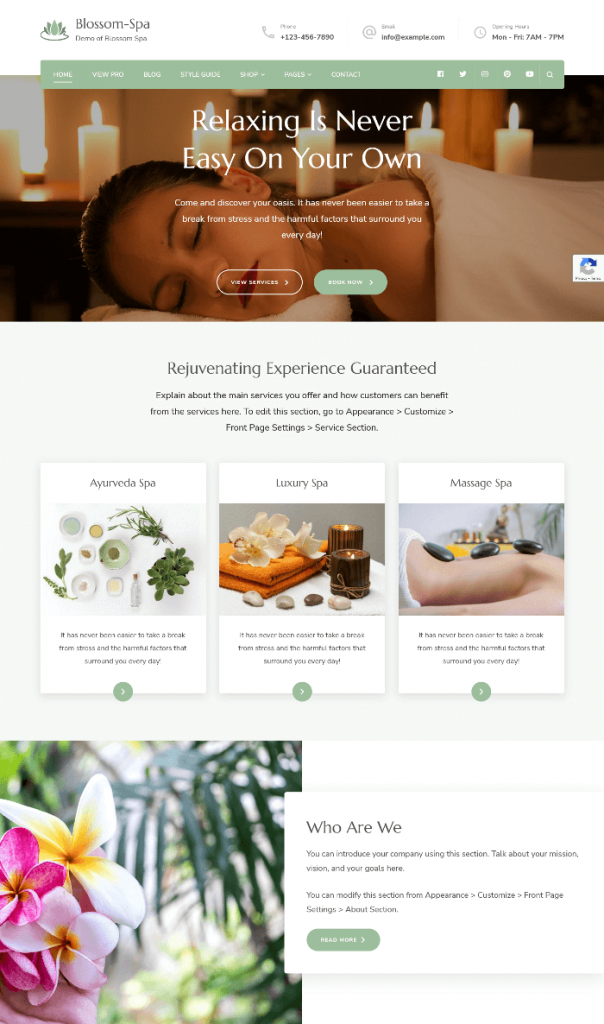
Best For: Spas, beauty salons, wellness centers, massage parlors, yoga studios, meditation classes, and natural health care businesses.
Not Ideal For: E-commerce stores beyond basic product displays, corporate websites, or sites needing complex service booking systems built-in.
One-line verdict: A service-focused spa-focused theme that focuses on showcasing services rather than blogs. The Pro version provides 8 starter templates and lets you rearrange homepage sections, delivering the right amount of features for wellness businesses.
Quick Scorecard
| Category | Score | Rank |
|---|---|---|
| Speed | 68/100 | #11 |
| Functionality | 85/100 | #4 |
| Design | 75/100 | #6 |
| Total Score | 75.7/100 | #8 |
| Overall Rating | 4.0/5 ⭐⭐⭐⭐ |
Performance Deep Dive
We tested Blossom Spa by:
- Fresh install: Installed the theme with one blog content
- After manual setup: Installed Contact Form 7, BlossomThemes Newsletter plugin, and created service pages to simulate real-world spa usage
Since there’s no demo importer in the free version, we manually built spa service pages to test performance.
| Metric | Mobile | Desktop |
|---|---|---|
| Score | 68/100 | 68/100 |
| LCP | 12.6 s | 6.9 s |
| FCP | 2.9 s | 0.7 s |
| CLS | 0.004 | 0.001 |
| Speed Index | 4.3 s | 2.9 s |
Fresh Install:
The theme scored 68 on both mobile and desktop. The mobile LCP of 12.6 seconds is slow and exceeds Google’s recommended 2.5 seconds. Desktop LCP at 6.9 seconds is also above the acceptable range, meaning visitors may wait several seconds before seeing the main content.
After Demo Import / Real-World Setup:
After demo import (available in Pro with 8 starter templates), performance IMPROVES to 71/100 mobile and 88/100 desktop. Mobile LCP drops from 12.6s to 7.8s with demo content
The CLS scores of 0.004 mobile and 0.001 desktop mean zero layout shifting.
Features & Functionality
Forms & Lead Generation:
- Contact Forms: Compatible with Contact Form 7
- Newsletter: Yes, includes BlossomThemes Newsletter plugin. Connects to Brevo, Mailchimp, and others. Supports popups via shortcodes.
Content & Layout:
- Blog Layouts: 3 blog page layouts in free version (5 total in pro). 4 sidebar options for single posts. Customizer controls for hiding/showing author sections, categories, post dates, and featured images.
- Portfolio: Dedicated portfolio page included
- Testimonials: Yes
- Service/About Sections: No dedicated or predefined sections
E-commerce & Technical:
- WooCommerce: Yes, with a dedicated shop page section
- Page Builders: Gutenberg and Elementor compatible
- Translation Ready: Yes
- Customization: Good
What’s Missing:
No dedicated booking system integration means you’ll need a separate plugin for appointment scheduling. However, for showcasing spa services, the free version provides enough features if you build manually.
What It Does Best
Blossom Spa is designed for spas, beauty salons, wellness centers, and similar service businesses. The functionality score of 85/100 reflects complete features for service-focused businesses rather than blogs.
For showcasing the services, the free version provides very few pre-built features. You must upgrade to the premium version as it provides 8 different starter templates for different niches within the spa/wellness category.
The theme includes a dedicated portfolio page and testimonial sections built specifically for service businesses. It’s compatible with both Gutenberg and Elementor, giving you flexibility in how you build pages. WooCommerce support means you can sell products or gift certificates directly from your site.
Design Analysis
The earthy green palette, soft candlelit imagery, and abundant whitespace communicate calm and self-care instantly. It is designed to convert visitors into clients, with a clear business-first structure that guides users from relaxation to booking. The typography is clean and readable without being generic.
Setup & Usability
No demo import option in the free version. You add your own images, create service pages, and set up homepage sections manually. Expect to spend 3-4 hours getting your site to match the demo quality.
Premium Version
What You Get With Pro: 8 header layouts, 5 blog page layouts, performance settings, one-page website option, 8 starter templates for different spa/wellness niches, ability to rearrange predefined homepage sections.
Premium Price: Starts at $69
The pro version makes sense if you need header flexibility, want pre-built templates, or need the ability to rearrange homepage sections. To showcase services professionally in Pro, you get prebuilt pricing page, portfolio, team, and gallery page layouts.
If you can build these yourself in the free version, skip Pro. Upgrade if you want the 8 starter templates or need the section rearrangement feature for custom layouts.
Bottom Line
At 5,000+ active installs and a 4.6/5 WordPress rating, it’s proven reliable for spa owners who want a professional site without hiring a developer.
For service-based wellness businesses, this theme provides the right amount of features. The Pro version ($69) adds 8 starter templates and the ability to rearrange homepage sections, valuable for custom layouts. If you’re comfortable building manually, the free version works fine.
Download: Blossom Spa | Demo: View Demo
9. Blossom Fashion
Best For: Fashion, beauty, and lifestyle bloggers who publish regularly; portfolio photographers needing clean image presentation
Not Ideal For: E-commerce-focused sites, corporate websites (design is too editorial for business use)
One-line verdict: The most-used Blossom theme (5,000+ installations) scoring 74.7/100 with strong functionality. The Pro version offers 21 homepage layouts and AdSense optimization essential for serious fashion bloggers; other templates are more modern than the default.
Quick Scorecard
| Category | Score | Rank |
|---|---|---|
| Speed | 73/100 | #8 |
| Functionality | 80/100 | #7 |
| Design | 70/100 | #10 |
| Total Score | 74.7/100 | #9 |
| Overall Rating | 4.3/5 ⭐⭐⭐⭐ |
Performance Deep Dive
We tested Blossom Fashion by:
- Fresh install: Installed the theme with single blog content
- After manual setup: Installed Contact Form 7, BlossomThemes Newsletter plugin, and created fashion content with images to simulate real-world fashion blogging
Since there’s no demo import in the free version, we manually built pages to test performance with fashion photography.
| Metric | Mobile | Desktop |
|---|---|---|
| Score | 67/100 | 79/100 |
| LCP | 18.9 s | 3.3 s |
| FCP | 3.0 s | 0.8 s |
| CLS | 0.017 | 0.004 |
| Speed Index | 4.7 s | 1.6 s |
Fresh Install:
The mobile score hit 67/100, and the desktop reached 79/100. The mobile LCP of 18.9 seconds is slow by modern standards. Desktop LCP at 3.3 seconds falls within the acceptable range but could be faster.
After Demo Import / Real-World Setup:
After demo import (available in pro version), scores dropped to 50/100 mobile and 62/100 desktop, with CLS jumping to 0.346 due to heavy fashion images and sliders. If you use this theme, build from scratch and aggressively optimize images. Avoid sliders if possible; they’re killing the load times.
Features & Functionality
Forms & Lead Generation:
- Contact Forms: Compatible with Contact Form 7
- Newsletter: Yes, includes BlossomThemes Newsletter plugin. Connects to Mailchimp, Brevo, and more. Supports popups via shortcodes.
Content & Layout:
- Blog Layouts: Simple minimal layout with 3 sidebar options for posts. Customizer controls for hiding/showing author section, category, post date, and featured image. Also includes a banner section for slider or video content, and dedicated WooCommerce shop section customization.
- Portfolio: Dedicated portfolio page included
- Testimonials: Yes
- Service/About Sections: No dedicated or predefined sections
E-commerce & Technical:
- WooCommerce: Yes
- Page Builders: Gutenberg compatible
- Translation Ready: Yes
- Customization: Good
What’s Missing:
The free version locks 21 homepage layouts behind the pro paywall. Most blogging themes offer 3-5 layouts maximum, so this is a significant limitation. Google AdSense optimized advertisement areas are also pro-only, which matters for fashion bloggers who monetize through ads.
The 5 starter templates in premium break away from the traditional feminine style and offer more modern options.
What It Does Best
Blossom Fashion is a blog theme for fashion bloggers looking to take their work seriously. With 5,000+ active installations, this is the most-used Blossom theme on WordPress.org, proving its reliability and popularity among fashion content creators.
For serious users, the premium version offers features a blogger needs: 21 homepage layouts are something most blogging themes don’t provide. Google AdSense Optimized Advertisement Areas is one of the important features required for fashion bloggers monetizing their content.
Design Analysis
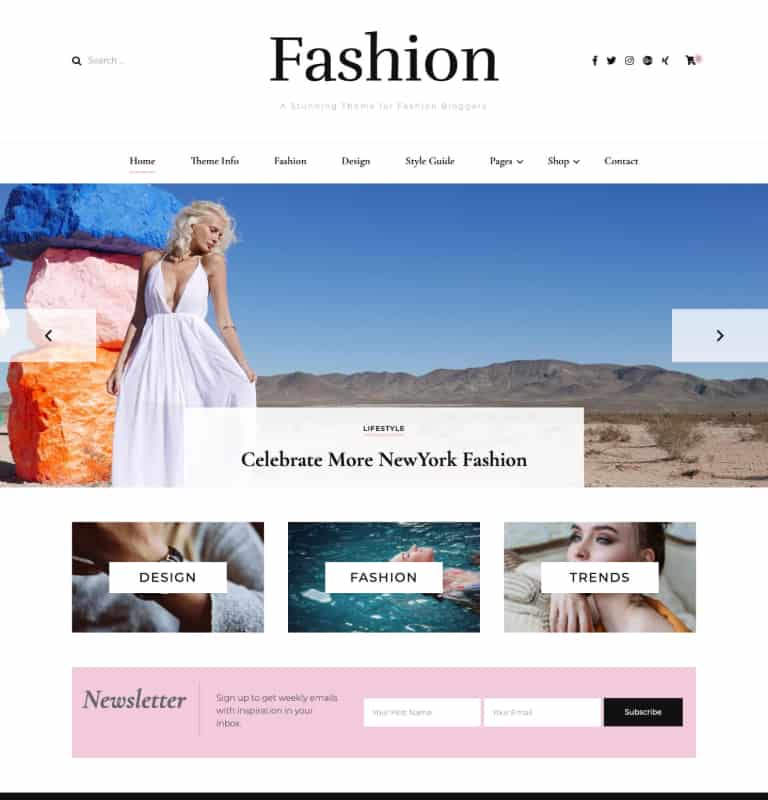
This theme channels modern editorial minimalism. The bold serif masthead, generous whitespace, and black-white-pink palette create a clean, fashion-forward look that feels curated rather than cluttered.
It strikes a balance between feminine and sophisticated, avoiding the generic pretty-pink-blog look in favor of something that could sit alongside established fashion publications.
Setup & Usability
No demo import option in the free version. You configure the banner section, sidebar layouts, and newsletter plugin manually.
The learning curve is moderate – expect to spend 2-3 hours getting familiar with all the Customizer options. The interface is well-labeled, but the sheer number of settings can overwhelm first-time users.
Premium Version
What You Get With Pro: 8 Header Layouts, 7 Slider Layouts, 5 Single Post Layouts, Full Footer Copyrights Editor, Unlimited Advanced Sidebar, 5 starter templates
Premium Price: starts at $59
The pro version is worth it for fashion bloggers who monetize through ads or need more layout variety. The 21 homepage layouts and Google AdSense optimization justify the cost for serious content creators. Hobbyists can stay on the free version.
Bottom Line
Blossom Fashion delivers where it counts for content creators: strong functionality, built-in newsletter tools, and a professional editorial design.
For serious fashion bloggers, the Pro version ($59) is recommended. The 21 homepage layouts, 5 starter templates, and AdSense optimization are valuable for professional blogs.
Download: Blossom Fashion | Demo: View Demo
10. Blossom Wedding
Best For: Wedding invitations, wedding blogging, couples sharing their wedding journey
Not Ideal For: E-commerce sites, corporate websites
One-line verdict: A wedding-specific theme with dedicated story/gallery/invitation sections scoring 85/100 for functionality when evaluated for wedding needs.
Quick Scorecard
| Category | Score | Rank |
|---|---|---|
| Speed | 64.5/100 | #15 |
| Functionality | 85/100 | #6 |
| Design | 70/100 | #11 |
| Total Score | 73.1/100 | #10 |
| Overall Rating | 3.7/5 ⭐⭐⭐ |
Performance Deep Dive
We tested Blossom Wedding by:
- Fresh install: Installed the theme with one blog content
- After manual setup: Installed Contact Form 7, BlossomThemes Newsletter plugin, and created wedding pages (story timeline, gallery, invitation, RSVP)
Since there’s no demo importer in the free version, we manually built wedding-specific pages to test performance.
| Metric | Mobile | Desktop |
|---|---|---|
| Score | 55/100 | 74/100 |
| LCP | 7.7 s | 2.9 s |
| FCP | 3.8 s | 0.9 s |
| CLS | 0.21 | 0.128 |
| Speed Index | 4.6 s | 2.2 s |
Fresh Install:
The mobile score sits at 55/100 with a desktop score of 74/100. The LCP of 7.7 seconds on mobile is slow — Google recommends under 2.5 seconds. Desktop performs better at 2.9 seconds, which falls into the acceptable range but still misses the ideal threshold.
After Demo Import / Real-World Setup:
Performance improved after demo import (Pro only) to 64/100 mobile and 87/100 desktop. Mobile LCP stays at 7.9s even with optimized demo content. Desktop performance is acceptable at 87/100 with the demo.
Install a caching plugin and aggressively optimize images before launching. The slow speed is the main reason this theme ranks #11 overall despite having excellent functionality for weddings.
Features & Functionality
Forms & Lead Generation:
- Contact Forms: Yes, includes Contact Form 7 plugin
- Newsletter: Yes, includes BlossomThemes Newsletter plugin. Connects to Brevo and Mailchimp. Supports popups via shortcodes.
Content & Layout:
- Blog Layouts: Simple minimal layout with 4 sidebar options for single posts. Customizer controls for hiding/showing author, categories, dates, and featured images.
- Portfolio: Dedicated portfolio page included
- Testimonials: Not included (not a key feature for wedding sites)
- Service/About Sections: Dedicated about section plus gallery, invitation, and story sections designed specifically for weddings
E-commerce & Technical:
- WooCommerce: Yes
- Page Builders: Gutenberg compatible
- Translation Ready: Yes
- Customization: Good
What’s Missing:
The theme lacks modern page builder compatibility beyond Gutenberg, so Elementor or Divi users need different options. No built-in testimonial section limits use for wedding planners who need client reviews.
What It Does Best
Blossom Wedding targets couples creating wedding announcement sites and sharing their wedding journey. The functionality score is excellent when evaluated FOR WEDDING NEEDS specifically.
For wedding websites, this theme provides decent features: SEO optimized, mobile responsive, dedicated wedding-specific sections (gallery, story, invitation, RSVP) with a romantic design perfect for wedding announcements. It’s not like other regular blogging or service-oriented themes – it serves a specific niche purpose.
Design Analysis
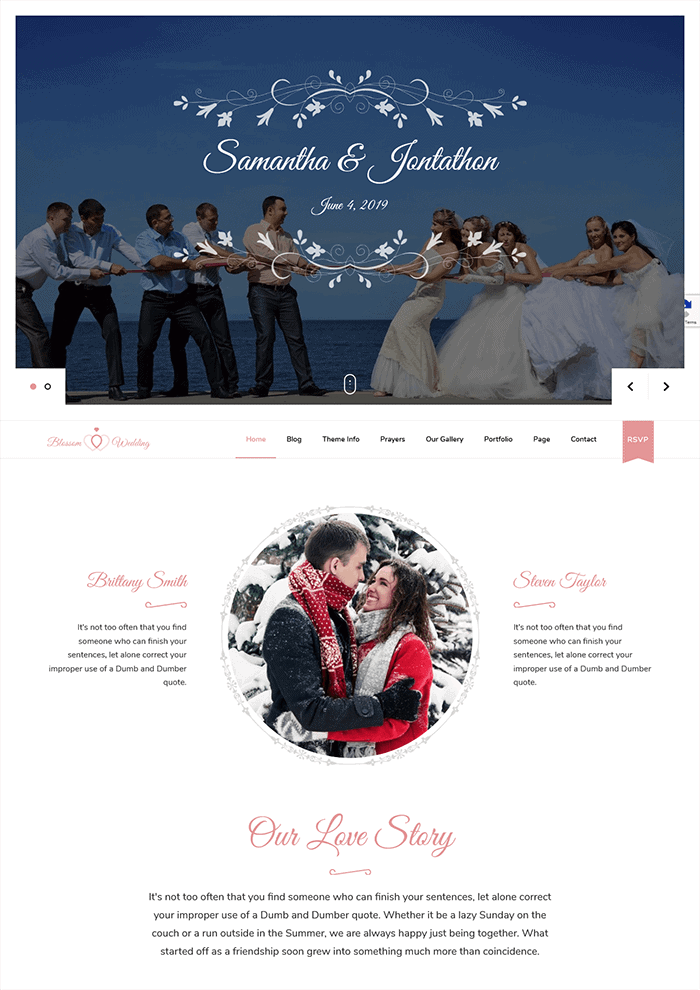
The design uses pink as the primary color with script fonts and circular image frames throughout. Decorative flourishes and romantic typography create a distinctly wedding-focused look. The visual style works for couples wanting a sweet, feminine aesthetic for their wedding website.
However, the layout feels crowded with multiple decorative elements competing for attention, and the overall look resembles older Pinterest boards rather than current minimalist wedding design trends.
Setup & Usability
The free version does not include a demo importer. You must build your site manually through the customizer, adding content to each wedding-specific section one by one.
Setup time depends on how much content you need to add, but expect to spend several hours configuring the story, gallery, invitation, and RSVP sections from scratch.
Premium Version
What You Get With Pro: Demo importer for one-click setup, built-in social share buttons for content distribution
Premium Price: Starts at $59
The premium version solves the biggest free version problem: manual setup. The demo importer reduces setup time, significant for couples planning a wedding with limited time.
However, there are no distinctive features beyond the demo importer. No advanced wedding-specific features, no unique Pro capabilities. Couples with just one wedding site should evaluate if $59 is worth saving 4-6 hours of setup time.
Bottom Line
For couples announcing their wedding, this theme includes everything needed: story sections, galleries, invitation displays, and RSVP integration. The low overall ranking comes from slow mobile performance and dated maximalist design.
For faster alternatives with better performance, consider the Rishi Theme with wedding starter templates.
Download: Blossom Wedding | Demo: View Demo
11. Blossom Travel
Best For: Travel blogging, lifestyle blog, personal brand building, and selling digital products
Not Ideal For: Travel agencies, tour operators, adventure travel companies needing booking systems
One-line verdict: A travel blogging theme where the free version is sufficient for travel BLOGGERS (not agencies). Pro offers 6 Gutenberg starter templates with more modern/colorful designs than the default, average features compared to other blogging themes.
Quick Scorecard
| Category | Score | Rank |
|---|---|---|
| Speed | 67/100 | #13 |
| Functionality | 80/100 | #8 |
| Design | 72/100 | #8 |
| Total Score | 72.8/100 | #11 |
| Overall Rating | 4.0/5 ⭐⭐⭐⭐ |
Performance Deep Dive
We tested Blossom Travel by:
- Fresh install: Installed the theme with one blog content
- After manual setup: Installed Contact Form 7, BlossomThemes Newsletter plugin, and created travel content with destination photos
Since there’s no demo importer in the free version, we manually built travel blog pages to test performance.
| Metric | Mobile | Desktop |
|---|---|---|
| Score | 68/100 | 66/100 |
| LCP | 11.3 s | 5.7 s |
| FCP | 3.0 s | 0.9 s |
| CLS | 0.038 | 0.017 |
| Speed Index | 3.9 s | 3.5 s |
Fresh Install:
The mobile score hit 68 out of 100, while the desktop scored 66. The LCP of 11.3 seconds on mobile is slow and needs improvement. Desktop LCP at 5.7 seconds is better but still falls short of the recommended 2.5 seconds for good performance.
After Demo Import / Real-World Setup:
The demo content (Available in Pro) includes well-optimized travel imagery that actually helps performance instead of hurting it. The theme shows what’s possible with proper image optimization. If you compress your travel photos properly, you’ll see performance closer to the demo numbers.
Features & Functionality
Forms & Lead Generation:
- Contact Forms: Yes, includes Contact Form 7 plugin
- Newsletter: Yes, includes BlossomThemes Newsletter plugin. Connects to Brevo and Mailchimp. Supports popups via shortcodes.
Content & Layout:
- Blog Layouts: Simple minimal layout with 3 sidebar options for posts in the free version. Pro adds 6 header layouts, 4 post layouts, and 5 blog page layouts. Customizer controls for hiding/showing author, categories, dates, and featured images.
- Portfolio: Dedicated portfolio page included
- Testimonials: Yes
- Service/About Sections: Dedicated about section, gallery section, and destinations section
E-commerce & Technical:
- WooCommerce: Yes, with dedicated shop settings for product display, categories, and image dimensions
- Page Builders: Gutenberg compatible
- Translation Ready: Yes
- Customization: Good
What’s Missing:
You only get 2 header layouts compared to 6 in Pro. The blog and post layouts are limited to basic designs without the 4 unique post layouts and 5 blog page layouts available in the premium. No image lazy loading in the free version, which hurts performance on image-heavy travel sites.
What It Does Best
Blossom Travel is designed for travel bloggers, not travel agencies. This distinction matters; it’s built for personal brand building and storytelling, not booking systems or tour packages.
The free version is sufficient for most travel bloggers starting out. The theme includes 22 custom widgets, a dedicated portfolio section, and a destinations section. Extensive post customization is available through the Customizer without touching code.
The advantage of Pro is the 6 starter templates (all Gutenberg, not Elementor). Instead of the default theme design, the other starter templates are much more modern and colorful. They have a more contemporary vibe. If you don’t like the theme’s default design, explore the other templates before dismissing it.
Design Analysis
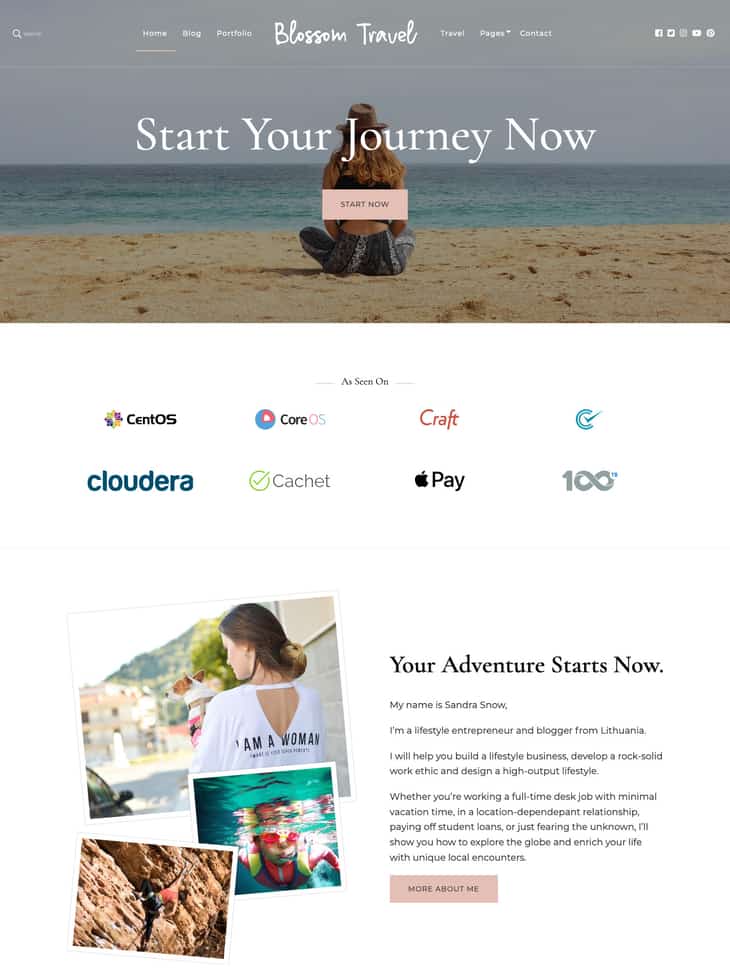
The dusty rose accents and clean layout create a calm, organized look. It feels more focused on building a personal travel brand than showcasing adventurous energy.
The default design looks dated compared to modern travel blogs that use bold imagery and minimal text overlays. The Pro version includes 6 starter templates that look more modern and colorful than the default design.
Setup & Usability
The free version has no demo importer. You build pages manually using the Customizer and Gutenberg blocks. Setup takes longer than one-click import themes, but the Customizer options are clearly labeled. Expect 2-3 hours to configure basic settings and create your first few pages.
Premium Version
What You Get With Pro: Demo Importer with 6 starter templates, one page website option, 5 blog page layouts, 6 single post layouts, 5 banner slider layouts, image lazy loading, Google Analytics integration
Premium Price: Starts at $69
The premium version is worth it if you’re serious about travel blogging as a business. The 6 starter templates save hours of setup time, and importantly, the other templates are much more modern and colorful than the default design. The 5 slider layouts give you better visual storytelling options for destination posts.
Bottom Line
The free version is sufficient for most travel bloggers. Upgrade to Pro ($69) when you need modern templates, layout variety, or lazy loading for performance. For personal travel brand building, this delivers average but functional blogging features.
Download: Blossom Travel | Demo: View Demo
12. Elegant Pink
Best For: all types of blogs, including lifestyle, fashion, mom, parenting and more
Not Ideal For: corporate and e-commerce websites
One-line verdict: Another Pinterest-style masonry theme that targets feminine lifestyle bloggers. The theme works best when built from scratch rather than using the demo import.
Quick Scorecard
| Category | Score | Rank |
|---|---|---|
| Speed | 83.5/100 | #3 |
| Functionality | 60/100 | #15 |
| Design | 60/100 | #15 |
| Total Score | 69.4/100 | #12 |
| Overall Rating | 3.7/5 ⭐⭐⭐ |
Performance Deep Dive
We tested Elegant Pink twice:
- Fresh install: Installed the theme with one blog content
- After demo import: Used the demo importer to test real-world performance with full content
| Metric | Mobile | Desktop |
|---|---|---|
| Score | 71/100 | 96/100 |
| LCP | 9.6 s | 1.1 s |
| FCP | 2.6 s | 0.6 s |
| CLS | 0.014 | 0 |
| Speed Index | 2.6 s | 1.4 s |
Fresh Install:
Mobile scored 71/100, and desktop hit 96/100. The mobile LCP of 9.6 seconds is slow and will frustrate readers waiting for content to appear. Desktop performance at 1.1 seconds is acceptable and meets Google’s recommended threshold.
After Demo Import / Real-World Setup:
Performance decreased after manual import, especially CLS, which became very high on both devices. The desktop score reduced compared to earlier testing.
Features & Functionality
Forms & Lead Generation:
- Contact Forms: Compatible with Contact Form 7
- Newsletter: Not included. Requires a third-party plugin.
Content & Layout:
- Blog Layouts: No customization options for single posts or blog archive layouts in the free version. All advanced layout options are Pro only.
- Portfolio: Not included
- Testimonials: Yes, via widget
- Service/About Sections: No dedicated section. Can be built manually.
E-commerce & Technical:
- WooCommerce: Yes
- Page Builders: Gutenberg compatible
- Translation Ready: Yes
- Customization: Limited in the free version
What’s Missing:
The free version locks all blog layout customization behind the paywall. You cannot change single post layouts or blog archive designs without upgrading. This severely limits content presentation options for bloggers.
No newsletter integration is built in despite targeting lifestyle bloggers who need email lists. You must add third-party plugins for basic email capture functionality.
Portfolio and dedicated service sections are absent. While you can build workarounds, competing themes include these features standard for lifestyle and creative professionals.
What It Does Best
The free version includes 22 custom widgets that cover most blog needs. These include advertisement widgets, pricing tables, client logos, call-to-action blocks, social media widgets for Snapchat and Pinterest, team member profiles, and testimonials.
Most themes charge for this many widgets or require page builder plugins.
WooCommerce compatibility, combined with Gutenberg support, makes this theme functional for basic online stores. The translation-ready code and WPML compatibility in the pro version support international audiences.
Design Analysis
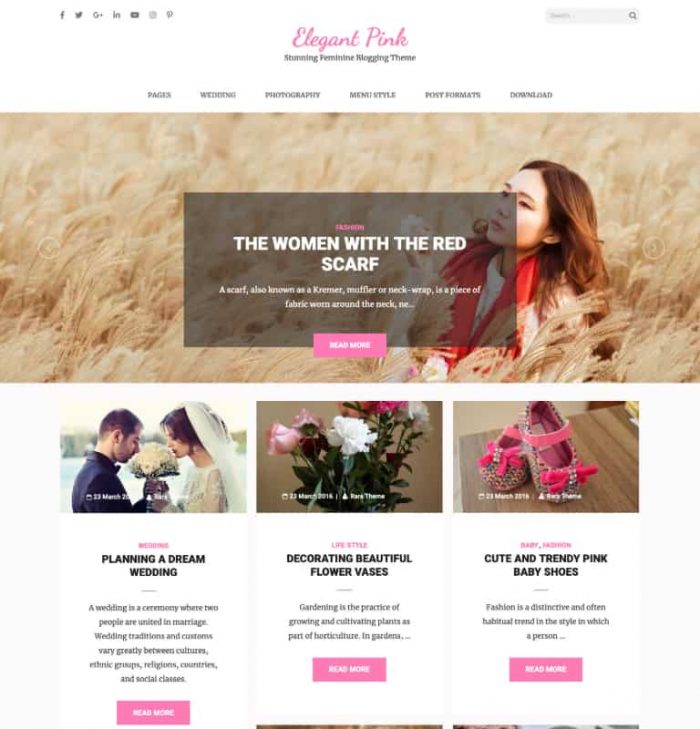
This theme fully commits to its namesake color with a Pinterest-style masonry layout combined with consistent pink accents. The relentless pink becomes monotonous without a secondary accent color to create visual relief or hierarchy.
The combination of masonry grid, aggressive pink, and rounded corners feels dated, more in line with 2015-2017 Pinterest aesthetics than 2026 design trends.
Setup & Usability
The demo import exists but requires multiple manual steps. You must install plugins, import content, and configure settings separately. Start with a blank install instead of importing the demo.
Premium Version
What You Get With Pro: 6 header layouts, 6 predefined homepage layouts, AdSense Optimised spots
Premium Price: starts at $59
The pro version adds essential features the free version lacks: blog layout customization and multiple header options.
For serious lifestyle bloggers, the $59 price is reasonable to unlock layout control and AdSense optimization.
Bottom Line
Elegant Pink delivers exceptional 96/100 performance on fresh installs, placing it third overall for speed. The 22 free widgets add value, but severe functionality limitations and dated pink-heavy design make this hard to recommend.
Only choose if you specifically need Pinterest-style masonry and exceptional baseline speed
Download: Elegant Pink | Demo: View Demo
13. Blossom Feminine
Best For: Lifestyle bloggers, fashion blogs, travel, beauty or basically any type of blogs
Not Ideal For: E-commerce sites, corporate websites
One-line verdict: A popular feminine blogging theme (3,000+ installations) designed purely for blogging, where Pro ($59) offers 11 modern starter templates that break the default pink monotony.
Quick Scorecard
| Category | Score | Rank |
|---|---|---|
| Speed | 70/100 | #10 |
| Functionality | 70/100 | #12 |
| Design | 66/100 | #14 |
| Total Score | 69/100 | #13 |
| Overall Rating | ⭐⭐⭐⭐⭐ (4.6/5) |
Performance Deep Dive
We tested Blossom Feminine by:
- Fresh install: Installed the theme with one blog content
- After manual setup: Installed Contact Form 7, BlossomThemes Newsletter plugin, and created lifestyle blog content
Since there’s no demo importer in the free version, we manually built blog pages to test performance.
| Metric | Mobile | Desktop |
|---|---|---|
| Score | 69/100 | 71/100 |
| LCP | 16.3 s | 4.8 s |
| FCP | 3.0 s | 0.8 s |
| CLS | 0.027 | 0.01 |
| Speed Index | 3.0 s | 2.5 s |
Fresh Install:
The mobile score landed at 69/100 while the desktop reached 71/100. The mobile LCP of 16.3 seconds is slow and will frustrate visitors on phones. Desktop LCP of 4.8 seconds is acceptable but still above the ideal 2.5-second target.
After Demo Import / Real-World Setup:
After demo import (available in Pro, desktop performance slightly dropped compared to the basic setup. CLS increased significantly to 0.318, which may cause noticeable layout shifts. Demo content adds visual weight and affects stability.
Features & Functionality
Forms & Lead Generation:
- Contact Forms: Yes, includes Contact Form 7 plugin
- Newsletter: Yes, includes BlossomThemes Newsletter plugin. Connects to Mailchimp and Brevo. Supports popups via shortcodes.
Content & Layout:
- Blog Layouts: Simple, minimal layout with 3 sidebar options for posts in the free version. Pro adds 8 header layouts, 5 post layouts with unique designs, 21 blog page layouts, and 4 slider layouts. Customizer controls for hiding/showing author, category, post date, and featured image.
- Portfolio: Dedicated portfolio page included
- Testimonials: Yes
- Service/About Sections: No dedicated or predefined sections
E-commerce & Technical:
- WooCommerce: Yes
- Page Builders: Gutenberg compatible
- Translation Ready: Yes
- Customization: Good
What’s Missing:
The blog layout options are limited to just one basic design in the free version, while competitors offer multiple grid and masonry layouts.
Most advanced layout options (8 header styles, 21 blog layouts) are locked behind Pro paywall at $59.
What It Does Best
The free version covers basic blogging needs, but serious bloggers should consider the Pro upgrade ($59), which unlocks 11 starter templates for different niches: Travel, Magazine, and Mommy blog.
These alternative templates are significantly more modern than the default design and break the pink monotony with varied color palettes you can customize to match your brand.
Design Analysis
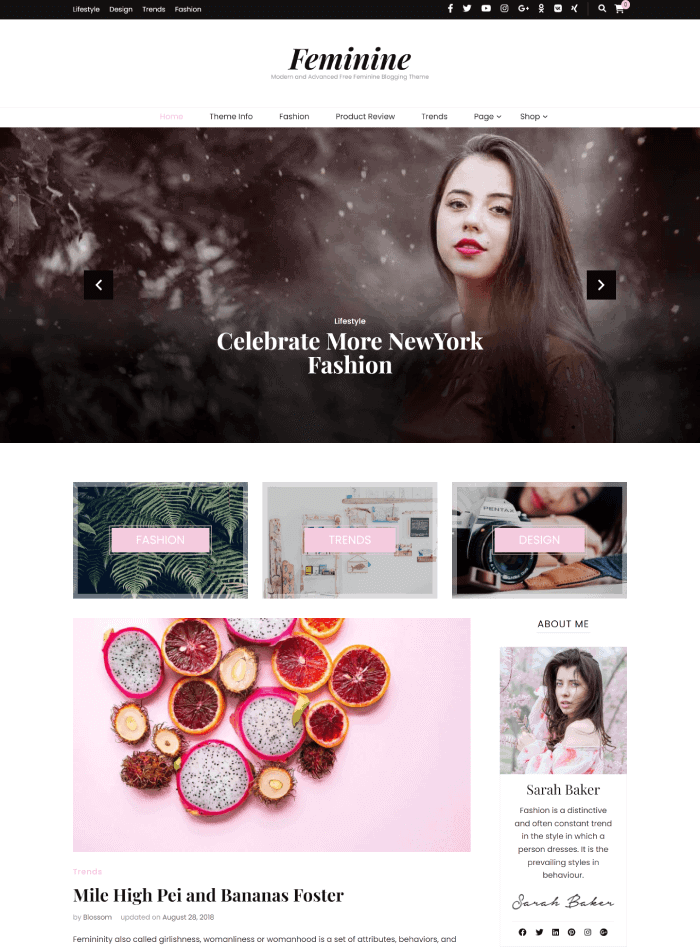
The default design delivers safe, conventional feminine blogging with a black-white-pink palette and traditional two-column layout.
However, don’t judge this theme solely on its default appearance. The Pro version ($59) includes 11 starter templates that completely transform the aesthetic.
These alternative templates break the pink monotony with varied color palettes and contemporary layouts. Colors can always be customized to your brand identity.
If you’re considering this theme and the default design concerns you, explore the demo of alternative templates (Travel, Magazine templates) first.
These offer cleaner, more current aesthetics than the default design. The 66/100 score reflects the default design only. With Pro templates, the visual appeal improves substantially.
Setup & Usability
The free version does not include a demo importer. You must build your site manually using the Customizer and available widgets. Setup takes longer than themes with one-click demos since you configure each section individually. Pro users get access to 12 starter templates that speed up the process significantly.
Premium Version
What You Get With Pro: 8 header layouts, Google AdSense Optimized Advertisement Areas, 12 starter templates, 5 layouts for post with unique designs, 21 layouts for blog page layout. 4 slider layouts.
Premium Price: starts at 59$
The Pro version makes sense if you are serious about blogging and want design variety. The 12 starter templates eliminate the manual setup problem.
The 21 blog page layout options give you flexibility that most free themes can’t match. The AdSense optimization is valuable if you monetize through ads. If you’re just starting out or blogging casually, the free version handles basics fine.
Upgrade when you’re ready to differentiate your design and maximize ad revenue or need modern templates.
Bottom Line
With 3,000+ active installations, Blossom Feminine is one of the most popular feminine themes on WordPress.org. This popularity signals reliability, active developer support, and a proven track record—important for long-term site maintenance.
The theme is designed purely for blogging. If you need service pages, portfolios, or business-focused layouts, look elsewhere.
Download: Blossom Feminine | Demo: View Demo
14. Feminine Business
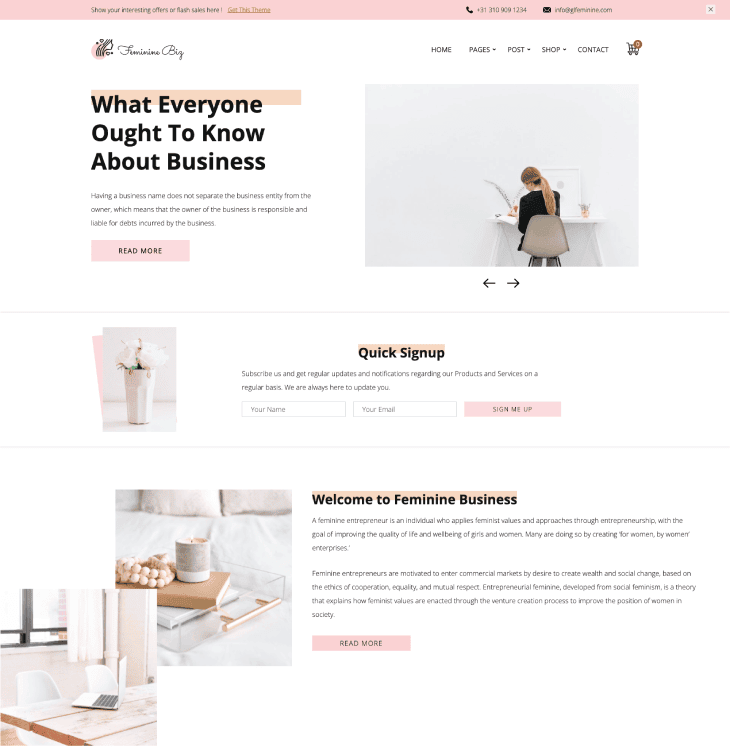
Best For: Lifestyle bloggers, female coaches, creative entrepreneurs, wellness businesses
Not Ideal For: E-commerce sites needing extensive product features, corporate websites requiring neutral branding
One-line verdict: A design-focused theme scoring 71/100 for aesthetics that targets female entrepreneurs with soft pink branding, though its 19.1s mobile LCP on fresh install is the worst in our tests.
Quick Scorecard
| Category | Score | Rank |
|---|---|---|
| Speed | 66.5/100 | #14 |
| Functionality | 70/100 | #13 |
| Design | 71/100 | #9 |
| Total Score | 68.9/100 | #14 |
| Overall Rating | 3.7/5 ⭐⭐⭐ |
Performance Deep Dive
We tested Feminine Business by:
- Fresh install: Installed the theme with one blog content demo content
- After demo import: Used available demo content (though no dedicated template exists for this theme’s specific design)
| Metric | Mobile | Desktop |
|---|---|---|
| Score | 66/100 | 67/100 |
| LCP | 19.1 s | 6.1 s |
| FCP | 1.2 s | 0.3 s |
| CLS | 0.182 | 0.18 |
| Speed Index | 2.9 s | 1.3 s |
Fresh Install:
The theme scored 66/100 on mobile and 67/100 on desktop. The mobile LCP of 19.1 seconds is extremely slow—users will wait nearly 20 seconds before the main content appears. Desktop performs better at 6.1 seconds, but this still exceeds the recommended 2.5-second threshold.
After Demo Import / Real-World Setup:
After importing content manually, mobile improves to 70/100 and desktop jumps to 93/100. The LCP drops from 19.1s to 7.9s on mobile, still not ideal, but far more usable.
Features & Functionality
Forms & Lead Generation:
- Contact Forms: Yes, includes WPForms plugin
- Newsletter: Yes, includes BlossomThemes Newsletter plugin with popup display and shortcode deployment. Connects to Brevo, Mailchimp, and other platforms.
Content & Layout:
- Blog Layouts: Single post page offers a minimal layout with 3 sidebar options. Customizer controls for hiding/showing author section, comments, and post date. No blog archive page customization options.
- Portfolio: Not included
- Testimonials: Not included
- Service/About Sections: No dedicated sections. Custom pages are straightforward to create.
E-commerce & Technical:
- WooCommerce: Yes, with shop page display controls, products per row settings, image dimensions, and store notice options
- Page Builders: Gutenberg and Elementor compatible
- Translation Ready: Yes
- Customization: Limited
What’s Missing:
No testimonial section despite targeting service-based businesses where social proof is critical. Blog page customization is absent; you only get single post options. The limited customization means you’re mostly stuck with the default design choices unless you write custom CSS.
What It Does Best
Feminine Business is designed for service-based businesses targeting female entrepreneurs, not blogging. The priority is showcasing services and building credibility with female-focused branding.
WooCommerce integration includes thoughtful store customization options. You can control whether the shop page shows products, categories, or both, adjust products per row, and set image dimensions.
Design Analysis
This theme embodies soft-power entrepreneurship. Business ambition wrapped in blush pink and morning coffee aesthetics.
The muted peach-pink palette, professional imagery, and strategic lead capture forms create a space designed to feel both aspirational and accessible to female founders.
The design walks a careful line between serious business and feminine warmth. The overall impression is encouraging, polished, and commercially focused.
Setup & Usability
The theme has a demo importer but no starter template for this specific design. The import process is more complicated than most themes in our test group. You’ll need to manually configure settings that other themes handle automatically during import.
First-time users should expect to spend extra time matching the demo appearance. The lack of a dedicated starter template means more trial and error.
Premium Version
What You Get With Pro: 4 header layouts, GDPR and CCPA compliance features
Premium Price: Starts at $59
The premium version adds minimal features for the price. Four header layouts and compliance tools don’t justify $59 for most users. The free version already includes the core design and newsletter functionality that make this theme attractive.
Only upgrade if you specifically need GDPR compliance tools and don’t want to use a separate plugin. Most bloggers and small business owners can stick with the free version.
Bottom Line
This is a service-focused theme for female entrepreneurs, not blogging. The free version is too limited for serious business use – no testimonials, no portfolio, minimal customization. The Pro version ($59) adds minimal value (4 header layouts, compliance tools) and isn’t worth the cost for most users.
Download: Feminine Business | Demo: View Demo
15. Blossom Pin
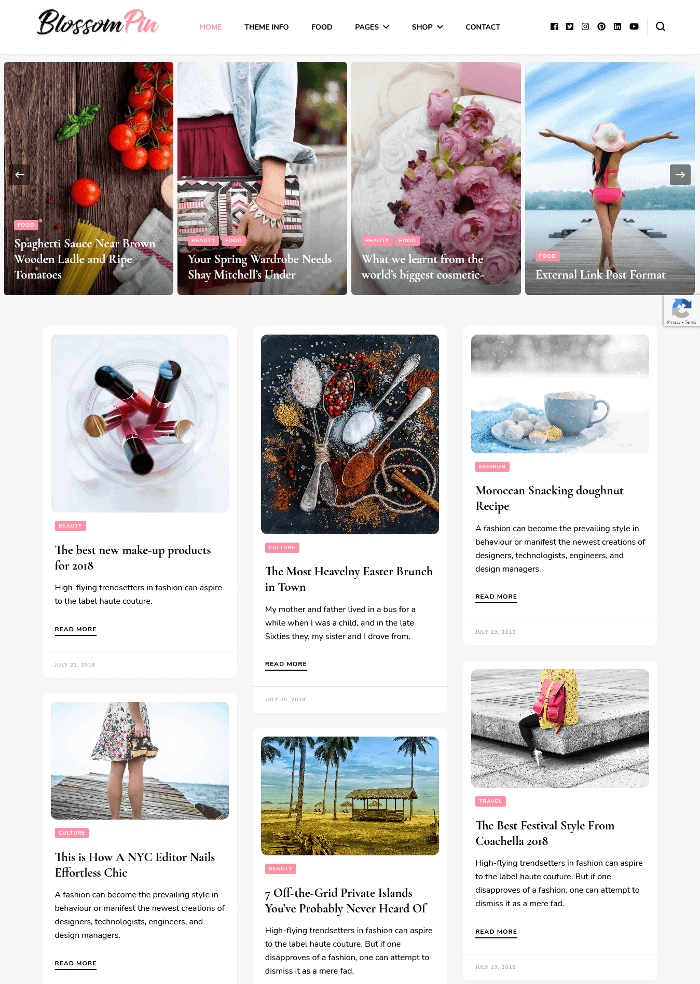
Best For: Pinterest-style websites, photography blogs, lifestyle and fashion blogs, any image-heavy content sites
Not Ideal For: Corporate websites, ecommerce-focused sites
One-line verdict: A Pinterest-style masonry theme extremely focused on image-heavy content with exceptional CLS (0.001) but limited blogging features.
Quick Scorecard
| Category | Score | Rank |
|---|---|---|
| Speed | 68/100 | #12 |
| Functionality | 70/100 | #14 |
| Design | 68/100 | #13 |
| Total Score | 68.7/100 | #15 |
| Overall Rating | 3.7/5 ⭐⭐⭐ |
Performance Deep Dive
We tested Blossom Pin by:
- Fresh install: Installed the theme with one blog content
- After manual setup: Installed Contact Form 7, BlossomThemes Newsletter plugin, and created image-heavy blog content with masonry grid layout
Since there’s no demo importer in the free version, we manually built image galleries to test the masonry grid performance.
| Metric | Mobile | Desktop |
|---|---|---|
| Score | 65/100 | 71/100 |
| LCP | 16.2 s | 5.8 s |
| FCP | 3.0 s | 0.8 s |
| CLS | 0.001 | 0.001 |
| Speed Index | 5.6 s | 2.1 s |
Fresh Install:
Mobile scored 65/100, and desktop scored 71/100 on the baseline test. The mobile LCP of 16.2 seconds is slow and will frustrate visitors on phones. Desktop LCP of 5.8 seconds is acceptable but not impressive for a fresh install with minimal content.
After Demo Import / Real-World Setup:
Performance decreased after manual import. High CLS values indicate noticeable layout shifting. You will need image optimization plugins and lazy loading to make this production-ready.
Features & Functionality
Forms & Lead Generation:
- Contact Forms: Compatible with Contact Form 7
- Newsletter: Yes, includes BlossomThemes Newsletter plugin. Connects to Brevo, Mailchimp, and others. Supports popups via shortcodes.
Content & Layout:
- Blog Layouts: Simple, minimal layout with 3 sidebar options for posts in the free version. Pro adds 6 header layouts, 6 post layouts, and 8 slider layouts.
- Portfolio: Dedicated portfolio page included
- Testimonials: Yes, via widget
- Service/About Sections: No dedicated section. Can be built using widgets.
E-commerce & Technical:
- WooCommerce: Yes
- Page Builders: Gutenberg compatible
- Translation Ready: Yes
- Customization: Limited in the free version
What’s Missing:
The free version lacks advanced layout options like multiple header styles or post grid variations. There are no dedicated service or about page templates, forcing you to build these sections manually with widgets.
What It Does Best
Blossom Pin is extremely focused on Pinterest-style presentation and blogging. This theme is perfect for lifestyle, fashion, or photography blogs (websites that rely more on images than text).
The theme includes 20 custom widgets in the free version. These widgets cover social media integration (Facebook, Pinterest, Snapchat), testimonials, team members, and newsletter signup. Most themes charge for this many widget options.
Design Analysis
The Pinterest-style masonry grid is well-executed and appropriate for lifestyle and fashion blogs. It creates visual interest and encourages browsing behavior that works well for image-heavy content.
The pink color scheme is safe and expected for feminine-focused brands. However, it lacks the sophistication of contemporary women-focused brands that now use richer palettes like terracotta, sage, cream, or burgundy. The relentless pink without secondary accent colors creates monotony.
Setup & Usability
The free version does not include a demo importer. Users must manually configure the theme settings and build their layout from scratch. This adds setup time compared to themes that offer one-click demo installation. The pro version unlocks the demo importer along with pre-built templates.
Premium Version
What You Get With Pro: AdSense optimized ad spots, 6 header layouts, 6 blog post layouts, 64 unique image patterns for backgrounds
Premium Price: Starts at $59
The premium version is worth it if you plan to monetize with ads or need layout variety. The AdSense optimization helps with ad placement without hurting user experience. The 6 header and post layouts give you more design flexibility than the single free option.
However, if you just need a basic Pinterest-style blog, the free version provides enough functionality with its 20 widgets and masonry grid.
Bottom Line
The theme is extremely focused on image-heavy, Pinterest-style presentation with limited comprehensive blogging features. Both the free and Pro versions offer fewer features than other blogging themes in our test.
It’s an average theme focusing only on Pinterest-style presentation—not comprehensive blogging features.
Download: Blossom Pin | Demo: View Demo
Complete Comparison: All 15 Feminine Themes
Speed Performance Rankings
| Rank | Theme Name | Mobile | Desktop | LCP Mobile | Speed Score |
|---|---|---|---|---|---|
| 1 | Astra | 99 | 100 | 1.0 s | 99.5/100 |
| 2 | Elegant shop | 96 | 98 | 2.6 s | 97/100 |
| 3 | Elegant Pink | 71 | 96 | 9.6 s | 83.5/100 |
| 4 | Chic Lite | 68 | 96 | 6.2 s | 82/100 |
| 5 | Blossom Studio | 71 | 82 | 18.2 s | 76.5/100 |
| 6 | Cookery Lite | 70 | 79 | 23.3 s | 74.5/100 |
| 7 | CoachPress Lite | 70 | 77 | 14.4 s | 73.5/100 |
| 8 | Blossom Fashion | 67 | 79 | 18.9 s | 73/100 |
| 9 | Rishi Theme | 69 | 76 | 11.7 s | 72.5/100 |
| 10 | Blossom Feminine | 69 | 71 | 16.3 s | 70/100 |
| 11 | Blossom Spa | 68 | 68 | 12.6 s | 68/100 |
| 12 | Blossom Pin | 65 | 71 | 16.2 s | 68/100 |
| 13 | Blossom Travel | 68 | 66 | 11.3 s | 67/100 |
| 14 | Feminine Business | 66 | 67 | 19.1 s | 66.5/100 |
| 15 | Blossom Wedding | 55 | 74 | 7.7 s | 64.5/100 |
Core Web Vitals – Mobile
| Rank | Theme Name | LCP Mobile | FCP Mobile | CLS Mobile | Speed Index Mobile | Mobile Score |
|---|---|---|---|---|---|---|
| 1 | Astra | 1.0 s | 1.0 s | 0 | 3.3 s | 99/100 |
| 2 | Elegant shop | 2.6 s | 1.8 s | 0.005 | 1.8 s | 96/100 |
| 3 | Elegant Pink | 9.6 s | 2.6 s | 0.014 | 2.6 s | 71/100 |
| 4 | Chic Lite | 6.2 s | 3.2 s | 0.013 | 5.1 s | 68/100 |
| 5 | Blossom Studio | 18.2 s | 2.6 s | 0 | 2.9 s | 71/100 |
| 6 | Cookery Lite | 23.3 s | 2.9 s | 0.026 | 2.9 s | 70/100 |
| 7 | CoachPress Lite | 14.4 s | 2.9 s | 0 | 3.0 s | 70/100 |
| 8 | Blossom Fashion | 18.9 s | 3.0 s | 0.017 | 4.7 s | 67/100 |
| 9 | Rishi Theme | 11.7 s | 2.6 s | 0 | 4.4 s | 69/100 |
| 10 | Blossom Feminine | 16.3 s | 3.0 s | 0.027 | 3.0 s | 69/100 |
| 11 | Blossom Spa | 12.6 s | 2.9 s | 0.004 | 4.3 s | 68/100 |
| 12 | Blossom Pin | 16.2 s | 3.0 s | 0.001 | 5.6 s | 65/100 |
| 13 | Blossom Travel | 11.3 s | 3.0 s | 0.038 | 3.9 s | 68/100 |
| 14 | Feminine Business | 19.1 s | 1.2 s | 0.182 | 2.9 s | 66/100 |
| 15 | Blossom Wedding | 7.7 s | 3.8 s | 0.21 | 4.6 s | 55/100 |
Core Web Vitals – Desktop
| Rank | Theme Name | LCP Desktop | FCP Desktop | CLS Desktop | Speed Index Desktop | Desktop Score |
|---|---|---|---|---|---|---|
| 1 | Astra | 0.5 s | 0.3 s | 0 | 0.7 s | 100/100 |
| 2 | Elegant shop | 0.5 s | 0.4 s | 0.038 | 1.5 s | 98/100 |
| 3 | Elegant Pink | 1.1 s | 0.6 s | 0 | 1.4 s | 96/100 |
| 4 | Chic Lite | 1.2 s | 0.8 s | 0.009 | 1.4 s | 96/100 |
| 5 | Blossom Studio | 2.5 s | 1.2 s | 0.001 | 1.7 s | 82/100 |
| 6 | Cookery Lite | 3.9 s | 0.8 s | 0.001 | 1.1 s | 79/100 |
| 7 | CoachPress Lite | 4.5 s | 0.8 s | 0 | 1.2 s | 77/100 |
| 8 | Blossom Fashion | 3.3 s | 0.8 s | 0.004 | 1.6 s | 79/100 |
| 9 | Rishi Theme | 5.0 s | 0.7 s | 0 | 1.4 s | 76/100 |
| 10 | Blossom Feminine | 4.8 s | 0.8 s | 0.01 | 2.5 s | 71/100 |
| 11 | Blossom Spa | 6.9 s | 0.7 s | 0.001 | 2.9 s | 68/100 |
| 12 | Blossom Pin | 5.8 s | 0.8 s | 0.001 | 2.1 s | 71/100 |
| 13 | Blossom Travel | 5.7 s | 0.9 s | 0.017 | 3.5 s | 66/100 |
| 14 | Feminine Business | 6.1 s | 0.3 s | 0.18 | 1.3 s | 67/100 |
| 15 | Blossom Wedding | 2.9 s | 0.9 s | 0.128 | 2.2 s | 74/100 |
A desktop typically performs better than a mobile. Themes should score 90+ on desktop for optimal performance.
Functionality Leaders (All 15 Feminine Themes)
Note: All themes in this comparison support WooCommerce and Contact Forms and are translation-ready unless otherwise noted.
| Theme | Blog Flexibility | Built-in Sections | Newsletter | WooCommerce | Customization Level | Best For | Score |
| Blossom Studio | 3 layouts + strong customizer | Portfolio + About | Yes | Yes | Good | Creative professionals | 90 |
| Cookery Lite | 4 sidebars + recipe focus | Recipe templates | Yes | Yes | Good | Food bloggers | 90 |
| Rishi Theme | 5 single + 4 blog layouts | Flexible (no fixed portfolio) | Compatible | Yes | Excellent | Advanced customization | 90 |
| CoachPress Lite | 4 sidebars (more in Pro) | Portfolio + About | Yes | Yes | Good | Coaches & consultants | 85 |
| Blossom Spa | 3 blog layouts | Portfolio | Yes | Yes | Good | Spa & wellness | 85 |
| Blossom Wedding | 4 sidebars | Wedding sections | Yes | Yes | Good | Wedding websites | 85 |
| Blossom Fashion | 3 sidebars + banner | Portfolio + Shop section | Yes | Yes | Good | Fashion bloggers | 80 |
| Blossom Travel | 3 layouts (more in Pro) | About + Destinations | Yes | Yes | Good | Travel bloggers | 80 |
| Astra | 4 blog layouts | Flexible | Compatible | Yes | Good | Multipurpose | 75 |
| Elegant Shop | Minimal layouts | Product-focused | No | Yes | Limited | Small eCommerce stores | 75 |
| Chic Lite | 3 layouts (more in Pro) | Portfolio | Yes | Yes | Limited (Free) | Lifestyle bloggers | 70 |
| Blossom Feminine | 3 layouts (more in Pro) | Portfolio | Yes | Yes | Good | Traditional bloggers | 70 |
| Feminine Business | Minimal layout | None dedicated | Yes | Yes | Limited | Small business owners | 70 |
| Blossom Pin | 3 layouts (more in Pro) | Portfolio | Yes | Yes | Limited (Free) | Pinterest-style blogs | 70 |
| Elegant Pink | Very limited (Free) | None | No | Yes | Limited | Basic lifestyle blog | 60 |
Design Quality Rankings (All 15 Feminine Themes)
| Rank | Theme Name | New Score | Reasoning |
| 1 | CoachPress Lite | 80 | Soft authority aesthetics – conversion-focused design for services |
| 2 | Cookery Lite | 78 | Purpose-built for recipe presentation, appetizing food layouts |
| 3 | Blossom Studio | 76 | Calm wellness vibe, appropriate for yoga niche |
| 4 | Rishi Theme | 75 | Modern, flexible, highly customizable |
| 4 | Chic Lite | 75 | Editorial elegance for fashion |
| 4 | Blossom Spa | 75 | Earthy service-focused design for spas |
| 5 | Astra | 74 | Minimalist personal elegance |
| 6 | Blossom Travel | 72 | Polished travel aesthetic |
| 7 | Feminine Business | 71 | Soft-power entrepreneurship |
| 8 | Blossom Fashion | 70 | Editorial minimalism |
| 8 | Blossom Wedding | 70 | Maximalist romance – works for traditional weddings |
| 9 | Elegant Shop | 68 | Basic e-commerce design |
| 9 | Blossom Pin | 68 | Pinterest-style masonry |
| 10 | Blossom Feminine | 66 | Safe, conventional feminine |
| 11 | Elegant Pink | 60 | Dated pink-heavy Pinterest aesthetic |
Frequently Asked Questions
Do I need a premium theme or is free enough?
A free theme is enough to start. It includes the basic features you need. Upgrade when you want more design options, premium templates, or faster support. Many bloggers switch to premium as their traffic grows.
Do I need coding knowledge to customize feminine themes?
No coding is needed for basic changes. You can adjust colors, fonts, and layouts using visual settings. Beginners can build a site in a few hours. Advanced changes may require code or a page builder.
Will feminine themes work with my existing plugins?
Most themes work well with popular plugins like Yoast SEO, WooCommerce, and contact forms. Always check the theme documentation and test on a staging site before switching.
Which feminine theme is best for Instagram-focused fashion bloggers?
Blossom Pin is great for Instagram layouts and photo grids. If speed and performance matter more, Rishi Theme is a strong choice. Pick based on your top priority.
Can I switch themes later without losing content?
Yes. Your posts, pages, and media stay safe. You may need to reset menus, widgets, and design settings after switching.
Do feminine themes work well on mobile devices?
Yes. Most are fully responsive and look good on phones and tablets. Always preview your site on mobile before publishing.
Final Recommendations
We tested 15 Feminine Themes. Here are the winners:
- Best overall: Rishi Theme
- Best for Speed: Astra
- Best for Functionality: Rishi Theme
- Best for Design: CoachPress Lite and Blossom Feminine (Pro version, not the Free)
- Easiest to set up: Rishi Theme and Astra
Tested and published on: 2026-02-24